
 By
By The Droid X has been rooted – we learned that a few days ago. The process – while simple to ADB and command line users – was still pretty involved. The guys at AllDroid have come up with a very simple process to remedy any worries anyone might have with pulling the trigger on unlocking the device.
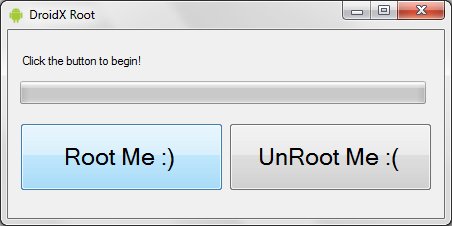
A simple program asks you to plug your phone in and click “Root Me :)” or “Unroot Me :(” depending on what you want to do. Let the process finish up and you’re on your way. It’s said that more features will be added over time – including the ability to sideload apps, remove Verizon and Motorola’s bloatware, and backing up your device information – but for now it’s still a fantastic little utility that you should download if you were intimidated by the root method that came before it. (Note: a windows-based PC is required to use this.)
[via Droid-Life]






Awesome. One question though. Will this work on the HTC evo for sprint? Oh and by the way. First lol.
I shall be watching this tool very closely. The ability to side load apps and remove bloatware will make this a HIT immediately.
My RSS feeder is full of Android news these days looking for the news the minute it happens. thank you Phandroid for reporting promptly.
Oh this is awesome!
Genius. Just genius.
I’ve already passed this article along to half a dozen of my friends :)
Anyone have any success with this method?
You can sideload apps on any android phone.
Why cant we have a simple Root for Nexus One.. with out unlocking bootloader… Come on Dev.. I been waiting for a simple root with out bootloader unlock sine January…
@John why on earth would you buy a nexus one without an unlocked bootloader?
Is there anything like this for the Incredible?
@Dave – actually that is not true. You can sideload apps on any rooted Android phone and many non-rooted phones, but not all non-rooted phones. Some phones are locked down to prevent side loading of apps. Very Apple like in that regard.
@sic0048 even the AT&T Aria now has sideloading via a community program, which phones lack it?
This is extremely encouraging: the Droid X developer/hacking community is clearly hard at work despite the protection on this phone. I keep gaining more faith in them with every day that goes by. Who knows, maybe we’ll even see a method of loading unsigned ROMs in the future. Keep up the good work guys!
@kwest12 just semantics but if it happens it’ll be signed, but signed by the hackers to make the phone think they are Motorola.
About time something like this came along.
@sic0048 Actually, you are wrong. You can sideload apps to any Android device via the Android SDK and adb. Additionally, community members have created an application that simplifies the process, though uses the same underlying mechanism, called the Sideload Wonder Machine. This should work on any Android device regardless of Android version, manufacturer, carrier, or specific feature-locks.
someone needs to make installing android on the iPhone this easy
I wonder if this method can be adapted to the devour, I understand the rooting process is basically the same with both phones but a diff su.apk file for the devour.
This needs to advance to All Android Phones
I really want to do this, can somebody confirm they did this with no issues?
@PhoneDog if you can’t handle normal rooting process, maybe you should think twice about rooting.
Isn’t the removing of bloatware what got another ROM chef in trouble with Google/Verizon before? Or was that different case?
im trying this with my droid x and it says cant find it. which mode should i have it in…”usb mass storage, pc mode, charge only, or windows media sync”??
@brian
you’ll want to put it in usb mass storage.
I’m sorry if this question is dense, but if the bloatware can not be removed why root the phone? My Droid X is my first real smartphone. What does rooting allow you to do? I would pay money to get the damn bloatware off the phone.
Will not work for my droid x. Tried multiple times. I get to the very end and it says “failed.” I’ve tried it over and over and to no prevail. My droid was easily rooted the minute I purchased it. Droid x is too f***ing difficult to root. :-( this sucks
Did not work on Motorola i1 :( @ the end I get “Failed”
I can’t get this damn thing rooted man Sh#%. I hope works for you… retarded phone it has the earliest android version still can’t get it right.
Worked great on my Droid X. I love FREE wifi tether. Did i say its free maybe verizon will get a clue.
I downloaded it to a windows XP netbook. Open up the executable file and it does nothing. Any ideas?
I have the same issue. I think the program requires a PC. I’m trying to condom that though. Don’t quote me.
*confirm
Hi, does this tools works for sony xperia mini pro?
It has a very different design and home screen than other android phones.
does it work for Samsung Galaxy Ace ???
I guess this won’t work on a netbook? I’ve tried multiple times. Advice?