
 By
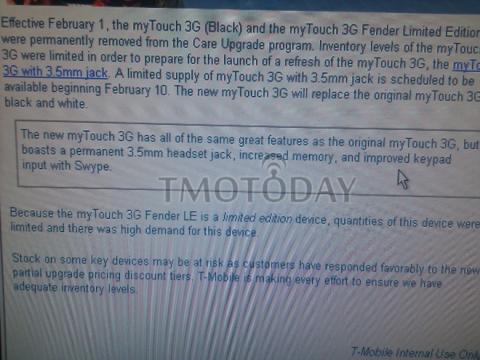
By News for myTouch 1.2 users, check the area inside the square in the middle of the screen shot. It states that the myTouch 1.2, which is the same as the myTouch 3G with 3.5mm Jack, will have the new Swype text input method. This will be the first touchscreen T-Mobile device ever to feature an alternative text input method.
For those of you who are unfamiliar with Swype, it’s a text input method where you simply swipe your finger across the letters on the keyboard to spell out your text. Here is a brief video demo of Swype.
Anyone use the Swype keyboard before? I have tried it once before and found it a little difficult but I’m sure with practice it gets easier. Any of you a fan?
[via TMoToday]






Can hardly believe this works ok.
wat about the cliq xt
I would love to try it out for myself. Seems like it’s possible to type/swype pretty quickly with a little time invested.
I have used Swype on my Droid for a bit and have replaced the stock Android keyboard with it. With very little use, and familiarity with spelling, it’s much quicker than the standard keyboard. It really isn’t comparable. Try it for an hour (maybe after watching the tutorial)and you will likely be impressed.
I’ve never used Swype, but I use Shapewriter ALL the time on my G1 and I love it! It’s sooooo much faster than using the on-screen keyboard. I wish they had a Swype app out on android Market, it looks like it works just a little smoother than Shapewriter :-P
I know before this came along, there was NO way I would ever buy an Android phone without a physical keyboard, but now with Shapewriter, I wouldn’t mind going without the keyboard if it meant having a slimmer device (like the Nexus One… *drool*)
SUPER EASY to use. I have been using it for 3 days now and will NEVER use any other keyboard on MT3G!!! Do the tutorial and within 2 mins you have the basics.
I have deleted ALL of my other keyboards now (other than stock Android)!!!
This was put out by the same guy that developed T9!! I thought it looked HARD and STUPID on the video and wasnt going to try it, but I am SO GLAD I did!! I will never use anything else now!!!
I installed Swype on my Droid a LONG time ago. It works really well actually. I was surprised at how well it worked. I use it on and off with my default android keyboard now, but I am definitely quicker with it.
I installed Swype on my Droid and for a Droid it’s perfect – when I can get two hands free I use the physical keyboard, but if I can only get one thumb free, Swype is much quicker than regular one-handed touch screen typing (and you CAN do regular hunt and peck input as well).
The only sort of weird thing is the way the suggestion box is formated (and you find yourself using that suggestion box a lot). Looks very unprofessional and is confusing the first few times.
Swype is freakin’ amazing, I can only hope it catches on so it gets more and more updates. Even adding words is easy, all you have to do is manually type them once while typing anywhere, and it’s added. Though that doesn’t seem to work 100% of the time, so I hope a non-beta version gets released for Droid one day.
It is funny, though – normally, when there’s a typo that means you have a misspelled word, but with swype you’ll never get a misspelled word with a typo, just a properly spelled word that isn’t the one you want! Though, it does have pretty good error correction that even when you miss a letter or two it can figure out what word you were going for.
Swype is a nice concept,
I was anxious to test it on my device now.
very recently I have download SlideIT keyboard which works perfectly on my device.
http://mobiletextinput.com/Product/SlideIT/symbian/download.php
Been using swype on my cdma Hero, and have 2 friends with swype on their mytouches. Great keyboard, gets a lot better after practice, nice to see it come standard on an android phone. Swype will work on 1.5 and up, but sound notifications need to be turned off to prevent Force Closing.
ugh….i have swype on my mytouch 3g (red) and im using swype to write this now…i could put up a video of me running it …if u want
how do u install swype on the mytouch 3g i have it in white??
i looked for it in the market and it saids there are no results
I swear by swype on my Droid. Great program even though its just beta, so much easier and quicker than native or better keyboard.
While it seems neat, is there a way I can default my keyboard to the standard Android keyboard… I have been messing around with it for a day now and I really do miss my keyboard on my G1.