
 By
By Over the weekend, Tyler and Joey spotted the tweet of an Android Developer/enthusiast named RyeBrye who claimed to have an application that – when used – would almost instantly root your phone. There were a ton of skeptics and rightfully so – giving an installed APK this level of access to your phone’s core OS functionality sounds kind of troubling. What if this “1 Click Root” was really “1 Click Brick” that instantly and permanently broke your phone?
Fear not: we can confirm 1 Click Root is real and it works on a number of different Android models. First lets talk about how YOU can use this application to root your phone and THEN lets talk about the implications of this application and its mere existence.
1 Click Root via Recovery Flasher
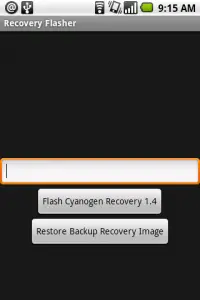
The original information for 1 Click Root was put together by RyeBrye (who says Zinx did all the work). Since then, UnknownKnita took RyeBrye’s raw APK file and published it to the Android Market as Recovery Flasher, adding a How To Guide and publishing the following video for your convenience:
There are also detailed instructions on RyeBrye’s Blog if you scroll down to the big letters that say UPDATE: More Detailed Instructions. You may want to check that out as it goes a bit more in depth. Please note that it is confirmed to work on the Dream and Magic but instructions may be slightly different so read up before you do ANYTHING and as always, proceed at your own risk.
How It Works
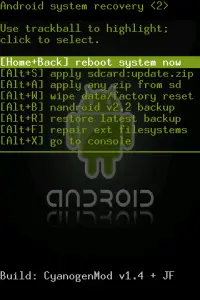
The whole story is explained by RyeBrye but I’ll try to make a long story short: there is an exploit in Android listed as exploit CVE-2009-2692 by the National Institute of Standards and Technologies National vulnerability Database. Google fixed/patched this problem on August 11th, but your phone is still operating with software that has this flaw and until your carrier pushes out an OTA update fixing the problem, 1 Click Root will work. The exploit allows you (or those who know how to) to execute anything at root but the prepackaged Recovery Flasher APK makes it clean and easy, utilizing that exploit to flash a ROM.
Why This Is A Problem
Sure, you love this exploit because it can hook you up with a rooted phone with minimal trouble. But someone could also use this exploit for very, very evil purposes and if you get a malicious APK on your phone that uses this exploit to either grab your personal information, brick your phone or something else… that wouldn’t be good. So as you can imagine, Google has somewhat of a PR and logistical nightmare on their hands and I’m sure a ridiculous amount of resources will immediately go towards getting carriers to push out patched updates.
RyeBrye himself notes the nature of this news and apologizes to the people who are likely put in panic mode as a result:
Apologies in advance to anyone who has to work quickly and work hard to patch this exploit in the wild. (Although it should be noted that if you just shipped phones that weren’t neutered in the first place, it would save us all a lot of work and help us all be on the same team… but that’s a topic for another post.)
The story is much different for users though, as one of the recommended Pre-Rooting steps includes:
Be prepared for the awesomeness you are about to unleash
Awesome? Indeed. Awesome indeed.
I Am Newb, Hear Me Roar
If you have no clue what all this rooting stuff is about, perhaps we can explain it in simple man’s terms. Google doesn’t provide full access to all of the functionality of the Android OS on phone’s shipped through carriers. Instead, it locks out and restricts certain capabilities for the safety of newbs like you. But WITH access to all of these features (aka root) you’re able to do some pretty amazing things. For example, you can install “future” versions of the Android OS.
Remember how everybody was screaming about “OMG I want haz cupcakez!” a few months ago? Cupcake was the “next” version of Android which, at this point, has already been released. Now the “next” thing is Donut and by using Recovery Flasher to Root Your Phone with 1 Click, you can install this “future” version of Android.
Wrapping It Up
This is a great thing for newbs who want root access but are afraid to go through all of the difficult steps. But for Google, the Android team, and carriers with Android Phones this is somewhat of a nightmare. This is a HUGE flaw and the exact reason why some carriers said they didn’t want to get on board with Android to begin with – at least until the platform was proven.
This is somewhat of a test – how will Google respond? How quick will patches be delivered OTA? Will Google police Android Market until a security fix goes out, hoping to catch any malicious apps in the process? Chances are that any malicious app will be delivered direct to device, otherwise the person is pretty much agreeing to be caught if they go directly through the market.
We’ll be watching closely as Google responds to this issue and you should watch this space as we’ll definitely bring you related news and updates. What an insane way to start a week… this is gonna be fun! Thanks to Unknownwita for sending this in and doing lots of legwork that others can use/enjoy! And of course to RyeBrye and Zinx for getting the job done in the first place!









Good article Rob
i tried it last night and it worked great i got dark hero on my g1
will this work on the mytouch 3g, too?
well, i’ll answer my own question, clicking on through to ryebrye’s blog, i see he’s done it on the mytouch 3g successfully. cool!
ok so ive flashed window mobile phones before but i want to root my g1. so this maybe a stupid question but if i download this does it come with a rom on it already or do i have to download a custom rom first? and what is the best rom to download. i read that some wont work with wifi and bluetooth which is a must for me.
has anyone tried UI Sense on g1 ? is it smooth or laggy ? all functions work properly or there are some restrictions ?
@baemike- no custom rom will come with it. U would have to download them on your own. But last part of your question is important for me also. “Which roms are the best ones?” I need wifi 2 work too!!!!!
well one part answered one to go! thanks cwalker.
also man if you find out a good rom please email me. [email protected]
i really want hero but from what ive read the bluetooth doesnt work.
Where can I get roms. [email protected]
I have Sense UI running on my G1 phone and it’s been running for a couple months now. And it’s awesome!
Months ago it was slow but the folks at XDA developers forum for G1 have it working great now and my latest version is very responsive. The bad news is that they set up a linux swap partition, optimized cpu clocking, etc. so it is pretty extensive.
In other words, just having root allows you to play around and experiment. But to really rock out the device you need to have an SD card with multiple partitions (the standard win formatted one for your files, a 1GB sized linux partition for moving the apps to the sdcard and a 32mb sized linuxswap partition).
Hey Guys,
I did it and guess it worked. Now I downloaded the latest CyanogenMod v3.6.8.1 Do I need to do a system wipe before installing this rom?
@baemike2> I got you!! As soon as i find any good roms, with everything working. I will send them your way. @cocoa> where can we get these linux sd card? Are they at you local stores or do we have to order onine? Which suck anyway, why can’t we rock out with the factory sd card? @the world> could u please post a link for us folks that don’t know where to go 2 find these custom rom!!!! I sure we could just google it, but I’m sure the good people of the android world would love 2 keep us post and up to date with the best of the best roms!!!
I just did this It booted into the recovery mode the first time but after that it just gave me a triangle with an exclamation point… I’m not sure what I should do… Should I do a factory reset and try again?
im having an orgasm :D:D:D:D:
i have a rooted G1 :DD wooho thanks
anyone in uk tried this yet?
Hey everyone a good site to download roms is: http://www.getyourdroidon.com or head over to the xda forum site(google it) for any other rom, since post download links for the roms are in there. Peace.
Awesome. My first thought when I heard about this vulnerability was “Well that’s shit. Should start writing Linux in C++ to avoid these problems…” and my second was “Good for Android!”.
Will I lose all my apps and have to re-install them if I use this?
Okay I’ve forgetten a lot of things about rooting. What are the side effects of rooting my G1? What do I have to be careful about? Is it okay to take updates? And what not. I’d appreciate any help. I would love to root my G1, I’ve just forgotten so much.
This works and is awesome. Multi touch, and tethering here I come :D
Will doing this erase all my contacts/music? or can I just proceed without backing it up? I know, noob question.
once you root your phone can you restore it?
after thinking about it for 3 days, and with the new article from Phandroid (Upgrade Your Android… Unless You Have A G1); i went ahead and rooted my G1.
@dude:
Yes, you can restore it to original image.
Just follow thru with the youtube vid and you are totally fine. :)
[rem to get the rom image to flash: else you just go back to default firmware] (i did that twice~)
i kinda remember getting a ota update like last week or before that. Is it safe to use this to root my phone? also what happens after i root my phone? do I loose anything? what are some good roms to get? so if anyone comment back on here or email [email protected] it would be very helpful
here are the instructions http://www.ryebrye.com/blog/2009/08/16/android-rooting-in-1-click-in-progress/
no you dont lose anything unless you wipe your data or install a custom rom, im not sure if that update patched the hole, what build are you using?if you need more help email me through the android market
What’s the best Hero Rom? Any suggestions?
T-Mobile Germany is pushing an OTA-update by today. I Think I postpone it for my G1 :)
@The best hero rom- I herd it was the “roger hero rom” smooth and stable. Go to youtube and type different types of rom to see for yourself. I just put jf 1.5 and the htc hero theme on mind g1 yesterday. Because its not many stable hero roms out there!! The roger rom take hours and hours to do. And you need the right sd card for it, its very complexs so get ready. But the 1 click root is the best thing that happen 2 my g1!!!
I wish I had something to test this but from the reviews it sounds promising.
Best Hero Rom in my opinion is DrizzJAC JACxHEROv1.2. It requires a bit of instruction fallowing. Good Luck on that.
powered unit back on ,recieved a white triangle with an yellow exclamation pointin the center phone not working please help g1 phone my 2gb micro sd card was almost full 23 mb left does that has anything to do with it
yeah my phone wont come out of recover mode everytime i boot it up it goes back to the root screen
@james brumsey
Dude, contact me if you have fixed this problem. It’s doing the same to me. And when I boot into Android I don’t think it’s rooted. Downloaded the ‘Terminal Emulator’ app and tried to execute ‘su’ and it said permission denied.
Gaining access to the recovery menu seems to work for one boot, and then when booting normally the phone isn’t rooted.
Contact me through my site, click on my name here to get there!
What is the “jf 1.5 and the htc hero theme” AND how do I get the hero theme on my MyTouch 3G?
Thanks
how do i partition my sd card on this 1 click root… i’m new to this …
I was successful on rooting (via 1-click) on my G1 (TMO USA) and was able to flash with the Cyanogen ROM v4.0.1 (zoom zoom zoom – STABLE) with no problems. (RyeBrye’s blog recommended Cyanogen v3.9.11.2 which is marked as experimental)
BTW: I initially installed 1-click via QRCode link, then I got notification of the v1.1.0 update in the Android Market and applied that update before I rooted. (I don’t know what’s new in 1-click’s v1.1.0 update
Hi,, I have successfully rooted my Tmo US G1 using the 1 click root app that I got from the market.. now I want to install a hero rom.. can anyone give me a step by step instruction on how to do this?! and no,, i haven’t partitioned my sd card yet.. sorry for being a total noob..
This app has been removed from the market… WHY?!!!!!
@oblivion> go to the webite call “THEUNLOCKR.COM” look up downloads for android. and they have a step by step video on how to partition your sd card and how 2 install a hero rom. very good site!!!!
im having a lot of problems since using this. 1. i cant flash any other roms. 2. my nandroid backup wont work. 3. when i try to use the bootloader to go back to rc29 nothing happens. so i need a lot of help so please contact me if you can. thanks
p.s. i think its because i tried to flash hero rom and i partitioned my sd and thats when it started acting like that
this is no more than an apk running an in essence adb flash recovery script, WOW! still does not get you local root so pretty pointless for the likes that want to root because they want bluetooth file share and wifi tethering etc
First for those experiencing the Triangle with the Exclamation mark just select ALT L and you will get the menu.
Secondly I did the 1 Click Root method and it does not give you root. So How do I get root now?
people please ust tell me if this works on the galaxy didnt any one do it yet
mine said install unsuccessful
I was about to do the one step root however, i saw that my build number is different then yours.. mine is CRC1 and yours in CRC28. Does that matter or can i continue on with the root?
I have the same question as Colin, can I continue on with this one click root if I have the CRC1 build? Halps pleasee
I installed the flash recovery, but when i press the backup button, its just says backup failed…what do I do?
Umm can i use this application using donut? help please.
Does this work for the LG ALLY from Verizon?
I downloaded it on the behold 2 but it said backup failed… how do i do it