
 By
By So, we decided to take a look at a bunch of home replacement apps available in the market. We have chosen to take a look at Panda Home, Open Home, dxTop, aHome, and GDE. We have enjoyed playing with the various apps and thought we would bring our thoughts to you.
PandaHome-FREE
Although it seems to be one of the least popular out there, Panda Home is a very user friendly and customizable home replacement. There are only about ten dedicated Panda Home themes, compared to the mass amounts for Open Home or aHome. At first glance this seems to be the downfall of Panda Home, however, Panda Home has the ability to open up all themes that are compatible with Open Home and aHome. Panda Home also lets you extend the number of home screens from 3 to 11.
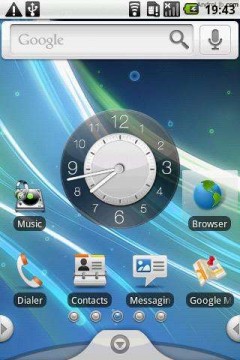
Panda Home also lets you mix and match themes. Say you find a theme with icons you like, but the background is ugly and the menu is boring. By selecting theme modules from the extremely colorful Panda Home menu, you can mix the icons of one theme with the background, search widget, clock, menu handle, and menu icons of another. This pretty much means it’s the most customizable.
Open Home-$3.99
Open Home supports multiple screens to place icons for apps or widgets and features its own new touch screen virtual keyboard. It allows an auto rotate and theme chooser, which will allow you to choose from the vast amounts of themes in the market as Open Home is one of the more popular home replacement applications. One of the most prominent features of Open Home is the addition of “Live Folders” which can display any source of data on the Home screen without forcing the the launch of an application. A Live Folder can be used to display all your contacts, your bookmarks, your email, your play-lists, an RSS feed, etc.
dxTop-$2.99
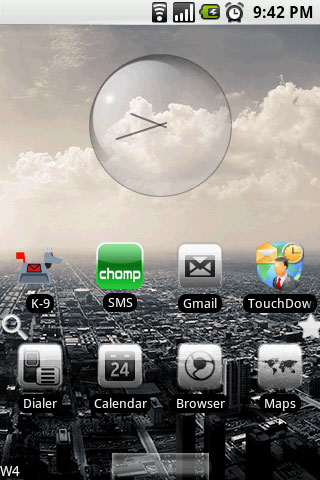
The dock of dxTop is excellent! Basically, you swipe your finger across the tabs at the bottom of the screen. It’s great to have the extra option to slide through the menu at the bottom for those who would like to keep their home screens relatively clean and widget/icon free. As for the home screens, you get 4 instead of 3, and instead of swiping left and right, you can swipe up/down/left right, which can be slightly disorienting but useful nonetheless. However, there’s a handy diamond key between the two tabs that helps orient you. Hitting home always gets you back to the top screen on the diamond no matter where you are.
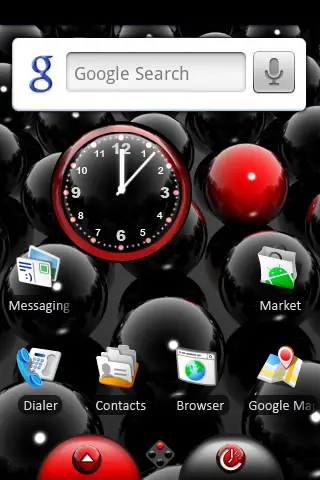
Another feature not seen in the other applications is the addition of a task manager drawer tab. It is helpful to remember what is still running and what was shut down to free up memory, or just to have a quick reference to recently used apps. There’s a color code system: red for currently running, yellow for a background service, white for recently used. Pressing an icon gives you the option to do nothing, look at application information, find it in the marketplace or stop it from running.
aHome-$4.99
aHome Android app features a console that allows you to launch the app, go to the Theme Downloader, or read the FAQs. aHome is cool because it allows you to easily download premade themes from the market, free and paid. aHome comes with a few widgets like a gps updated weather and digital clock that enhances your phone by bringing the information to you. The free version offers most everything as the paid except auto-rotate.
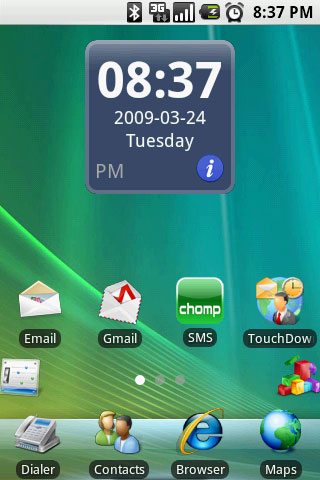
I have found that the aHome app is more cool than useful. It more just allows you to show off that your Android device can mimic the look of your friend’s iPhone or Windows Mobile based device. The market is flooded with themes that can edit your theme to look like any OS or even your favorite sports team.
GDE-£2.25=$3.57
GDE replaces the drawer with a new menu which is my favorite UI for changing the settings. Your apps can be separated into various folders which can help to organize your vast collections of Android apps. GDE also has customizable shortcuts to either side of the drawer, similar to the HTC Sense drawer, which adds a nice clean look.
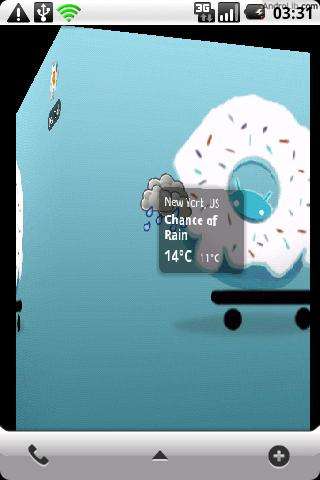
GDE has several new transitions that to enhance the original sliding between screens. You can rotate around a cube or fade between desktops. It comes with a “dock” widget for the desktop to store your favorite apps and can configure 1-7 screens and fast swipe across the screens will send you flying across multiple screens.
Conclusion
There are several home replacement applications out there for you to try, these are a few of the main ones that we have played with. Several have had multiple updates to give the app other features that were originally not available. For example, the cube transition has made its way around to more then just the initial GDE app. Although they all seem to significantly slow the speed of your device, some of the perks you can get from the apps out way the cons. Personally, I like the customization of the Panda Home but love the drawer of GDE and the potential to add shortcut buttons to it.
What are your thoughts? Which do you prefer?






I’ve tried a few home replacement apps and all of them have dragged my MT3G down to irritating speeds. They start out fine and in a about a 1/2 days use the phone becomes sluggish. These things seem to be popular so they must run smooth on other phones.
where is home++ ?
f) None of the above
I’ve been using Home++ for a while now, its definitely my personal favorite. With the additional menu at the bottom (which also slides to reveal additional menu items), and more up to 7 home screens, built in task manager, quick shortcuts to browser, bookmarks, task manager, phone, contacts, and voice input, in a very clean interface, I personally think it beats them all.
You didn’t try SweeterHome or Home++? Those are the best ones.
I’m shocked SlideScreen wasn’t included in this, it’s a much different than these Home screens which seem to just be slightly different from each other and the original home screen.
Tried Panda Home. I am a huge fan of it’s many features including having up to 6 additional drawers. Unfortunately I’ve never found it stable enough to rely on it day to day. With each update I give it a try again, as the customization is incredible, but stability is more important so I never stuck with it long. Haven’t tried the other options yet, and haven’t revisited Panda in a month, but now I think I will. [Droid]
Don’t forget about SlideScreen, fantastic home replacement!
I’ve tried the lite versions of Open Home, aHome and PandaHome, and if I were to choose one, I think my money would go to Open Home. Yes aHome has more skins available, I think, but I just overall enjoyed using Open Home a bit more.
Off topic though, I think that you all should give Sweeterhome a try. It’s hard, it’s intimidating, but it is awesome. It’s funny because it came out maybe a year ago when I first purchased my G1 and it was in version .24 for the longest time, and I always thought that it had such insane potential if people used it right and also if it were supported right. And the other night, I was browsing the Market on my N1 and I thought, why don’t I give it a try on here, and I downloaded it, accidentally pressed the “take me to developer website” button and they had just released the new version the same day! It’s awesome because it was stuck at .24 for almost a year and I figured that they had just given up on it.
The new version is still a bit buggy, but they’ve fixed a lot of the problems that were in the original release. I really recommend any power users and customization freaks to try it out.
Also, there another home replacement that I tried for the first time yesterday “SlideScrren”. It’s pretty cool, very simple to use (the lite version that is) and I think that it is very nice. I just think that it costs too much 6.99. :X.
Anyways, happy findings fellow Androiders.
I’m a SlideScreen user on my Droid here as well – I have a lot of data coming in from various streams, and this home screen – while not the prettiest thing you’ve ever seen, allows me to see it all at a glance.
The only one I’ve tried is PandaHome and I thought it worked pretty well aside from slowing the phone down quite a bit. I ended up removing it.
Rooting my MyTouch using CyanogenMod gave me the two main features I was looking for with an alternative home — landscape mode and more than 3 screens — and without any slowdown (actually, it sped way up).
I’m also surprised you didn’t try slidescreen. I’ve been using it since I saw a piece on gizmodo and love it. It replaces the home screen with information feeds for different online sources and local information such as missed calls and text messages. Defiantly worth a look.
“You didn’t try SweeterHome or Home++? Those are the best ones.”
Sweeterhome is nowhere near ready for a review like this..
Home++ isn’t on here… one of the best options.
Open Home is great bought it since i bought my G1, tried GDE pretty cool but im so used to Open Home can’t really use other home replacements. But what i like was Home++ love the dock but its still on beta so gotta wait :0
Home++ is th best IMHO, and I’ve tried all of these.
Slidescreen FTW!
I second the remarks about slidescreen. I have a Hero with HTC sense which offers its own homescreen improvements but I have found slidescreen’s radically different approach much more to my liking.
Home++ or SlideScreen are the best but I understand that there are still in Beta.
I’m also a fan of Home++
As with some of the other posters, I’m disappointed that neither Home++ or SlideScreen were included.
Home++ is a worthy homescreen replacement (and indeed, the Homescreen I used on my Droid for ages until I started beta-testing SlideScreen). The Power Strip feature is different from the usual, and fairly convenient. — http://hpp.intuitit.mobi/
SlideScreen is my current home screen, and it’s /vastly/ different than the existing ones. No widgets or multiple screens, but an incredibly clean and easy-to-read collection of up-to-date information, and then a separate app launcher screen. And the 1.1 version (currently in beta-testing) adds yet more interesting options and information sources. — http://slidescreenhome.com/
I have to agree about Home++ it has been the only home replacement that hasn’t cause any lag, at all, on my MyTouch 3G.
I just installed PandaHome yesterday and so far I like it. I love the customization and the ability to run 5 home screens. I was able to use their Flash tool on the website to make the theme I wanted. It seemed to make my G1 a little slower but not unbearable. I will continue to use it and see if it works long term. If not, I may wind up rooting my phone for the 5 screens (and apps2sd)
I’ve tried various home replacements but I’ve always ended up uninstalling and using the default home instead.
I’m really surprised you didn’t cover Home++. It’s extremely popular with the Moto Droid crowd.
Sweeterhome previe 2 FTW!!!
Another vote for Home++. It’s in beta, but it’s very fast (even faster than the default launcher in my experience), and the customizable dock at the bottom is great. The phone and browser buttons mean I can get rid of the Phone, Contacts, and Browser icons on the home screen. The Bookmarks button makes it a 2-click process to open any bookmark from home.
Why don’t you just root your phone! I’m running Cyanogens newest 4.2.13 build, and it comes default with 5 panes for home. And the biggest advantage of rooting vs using the apps in this article (no disrespect to the devs)? My g1 runs faster with 5 panes than it ever did with 3!
How about some QR codes for these, guys? I will keep asking… why not embrace the QR code?
I’m surprised you talked about live folders and app categories in other home replacements but not the ones in dxtop.
these are easily the best features of dxtop. You can categorise apps, then add live folders to the desktop that represent the categories. It means new apps you add to these categories are added to your folders on the desktop automagically making life easy.
I’ve gotta throw out more love for Home++. Works great on my G1, plenty of customization, absolutely love it.
@Eric McBride
I rooted my droid, and I’m currently running Bugless Beast rom. I still like Home++ – the speed is there (actually, way faster than it used to be since I’m at 950MHz), and I have the customizations and quick launch of the “Power Strip” at the bottom I’ve become used to. So simply rooting isn’t a replacement for the feature set alot of these alternative home screens, like Home++, can offer.
I’ve gotta say, I wish you went a little deeper with each of these. Specifically, I’d like to know how each of these effect system performance, and issues with FCs and stuff.
I tried PandaHome and GDE a couple months ago. They were both kind of cool, but I ended up uninstalling, because they really slowed down my phone a lot, and I found them to be pretty unreliable. I really did like Panda Home’s drawers on the side, but I wanted to be able to customize the order the icons were in.
If you have multiple home apps like I do I highly recommend downloading “Home Switcher” from the app store. It allows you to quickly change between different home programs.
.
Since I picked up my Droid I have looked as several different home screen replacements. I currently have Home++, Launcher+, Open Home and Slide Screen installed. I had Panda Home and liked it but it was just to buggy.
.
For all my digging my needs are pretty simple. I find nothing wrong with the standard 2.0 interface beyond the fact that 3 screens is not nearly enough. I am currently using Launcher+ (made by the same guys that make Home++). It is essentially Android 2.0 with up to 7 screens.
.
In my experience Open Home was kind of buggy. There has been several updates since I have used it last so I am going to give it another try. SlideMe is cool but I feel like it is too much of a gimmick. I don’t like it but that is just my $0.02. As always, the best one is the one that works best for you. My hat is off to all the developers!
stock android 2.1 is the way to go
Home++ is the ishhh
Just installed home++ and i like it so far
feels like a keeper.
GDE was ok. I rather use sence but I was pleased with it.
ahome sucks..they used to pay attention to the comments and update regularly, but since cupcake was released its lags and force closes over and over….worst $2.99 ive ever spent
Do any of these have any effect on Live Wallpapers on the Nexus One?
@JMG
You make a good point man. I havent tried out Home++. I ll give it a shot, although I wont expect miracles from the ole G1 :)
It’s Nice to have choices…huh?
What, someone hasn’t said it yet? Ok.
“out way”
No.
“outweigh”
Yes.
Sweeter Home preview 2 is awesome, but wasn’t included in this review for two good reasons. Is a preview, not ready for review as some other poster mentioned. It’s great though and i’ve tried them all. This has the most customization for the creative types and a place where you can share your own themes with others and vice versa. It can defnitely be confusing, but check out the forums and ask questions and pretty soon you’ll see how amazing the customization is. I am still learning new things i can do all the time.
“where is home++ ?”
quote !
I’m using Home++ which is the best so far (in my opinion;)).
It has a built in Task-Killer and a toolbar. And it’s free:
http://hpp.intuitit.mobi/
I cant find Sweeter Home preview 2 in the market as of 8:26 am CST, is there another place that I can get it thanks.
@Eric McBride
Maybe not, but its damn nice (as a vzw customer, now with the Droid ) to finally have a phone that upgrades instead of just updates :D
@Sizzler
Agreed, they are nice but just don’t work all that well on first gen android phones, g1 and mt3g (unless perhaps you rooted.) Way too slow. If they work better on the newer phones like Droid and Nexus I’d try these again.
does Home++ work for Droid Eris – I haven’t been able to find it in the app market or on their website – http://hpp.intuitit.mobi/ – would love to try it!!
Sweeter Home 2 is light years ahead of any of these. When they finally move past Beta and push to the market, it will blow these guys away.
Yes, there’s a learning curve, but the customization and themes are unbeatable. Check out themes here:
http://sweeterskins.net/
Really surprised Home++ wasn’t included. Works well and it’s free.
I’m currently running home++. i’v tried panda, gde, slidescreen, launcher from the nexus and sweeterhome2. i’ll stick with home++ and ultimatefavespro. on a droid. super smooth super fast, running only 3 screens and i luv the screenshot trick…..
Another vote for Home++ on the droid. Best free replacement by far. Smoothest.
Home++ is the BEST and fastest Home Replacement i could imaginge, with an ANIMATED Analog ClocK! :)
I love gde. What is the apparently that you manage your home with? Also how good is sweeter home
I would love to try out Home++, but I can’t seem to find it on the Market!!! I’ve got the Samsung Moment with Sprint. Can anyone tell me if Home++ is available for the Moment? If not, does anyone know if or when it will be available?
John – Samsung Moment has 1.5 installed, Home ++ uses 2.1 so it will not show up in the market. Either update the phone using the leaked copies of 2.1 for moment or wait till Sprint releases it offically. I used PandaHome when I was on 1.5 and it worked fine, no lag or anything.
Home++ does not yet support live wallpapers. They say it’s on the way, though. I’m still liking GDE, however it’s limited on good themes and information on how to develop your own.
I tried a lot of home replacement
I always fall back to home++
No lag, useful bottom menu and info
Allows full screen to hide the ugly gray bar notification
Smoothest while scrolling app list
2nd choice would be Helix launcher,
I bought GDE and aHome, they all slow down my milestone significantly
GDE was fine on my HTC Hero but became *very* lagy on the milestone
— Running motorola milestone 2.1 rooted —
@Sinz Thanks, Sinz. That’s good to know. I kind of figured it would be something like that, unfortunately :(
Sprint needs to get off their @$$3$ and release the 2.1 update already :P From the looking around and research I’ve done, it could be as late as June when they release it, sadly :*( I’m definitely not going to install a leaked upgrade, as I don’t want to risk bricking my phone (I’m not too good with tech stuff). But thanks for the info and advice!
Tag Home, Zeam, and Helix Launcher were not mentioned either. Tag Home is cool, Zeam is for minimalists, which I am and I like and also Helix Launcher is cool too, although like previously mentioned very similar to the ones reviewed.
Gde works the best on my xperia x10i
home++ was often freezing and not smoothly running
Another vote for Tag Home works brilliantly on my xperia x10 oz version. Tried most of them but speed is great on this and great on battery.Plus has tray as well.
LAUNCHERPRO is better than any of these, great features, nice and smooth, never force closed on me yet
Simple Home is an option if you’re looking for accessibility, speed and simplicity. It has the option to filter out apps and it will automatically sort your apps according to how frequent/how recent the apps are used
SCREW ALL OF THIS!! :P
jk
have any of you tried Pro launcher or its big brother pro launcher plus (the donate version) ?
they are really good home replacements. i have a mytouch 3G slide and it works wonders for my phone, i have experienced no sluggish menu screens or orenientation sluggish-ness. also its just as customizable as panda home (well that may be a stretch)
i’ve tried all the home replacements (the good ones anyways)
and my list from best to worstgoes as follows:
1.Pro Launcher (plus): great interface, highly customizeable and sleak. brings a new and fun look to your phone!!
2.AHome: i used this one for quite some time before i upgraded to pro launcher. it’s really great! there are so many themes to choose from, and its easy to uninstall right from the home screen(s).
3.PandaHome: seriously the most customizeable home replacement app out there. makes life easier, but i did experience some sluggishness on the interface. other than that i highly reccomend it to new home replacement users! :D
4. Ihome: idk why this one didnt make this list but ok. great app. sleak interface and comes with really cool (FREE) downloadable skins and themes, worked wonders on my MyT3G, i loved it..until it started to force close on me everytime i used any type of task manager. maybe that’s just soething that happens with mytouch slide, idk??
5. Home++: finally is Home++, amazing app, actually it should be like number 3 or 2 on my list but i had totally forgot about it :P has a great interface and allows greatcustomizations. i really reccomend this to any experienx=ced HomeR!! made me smile until i realized that my phone was running a bit sluggish. probably because the MT3GS is a mid ranged android phone, but i havent heard any complaints about it being sluggish on the EVO, or the new Samsung Vibrant 3peat series. soo i guess it comes down to the phone and the users taste!
hope i was of some help! :D
I would have to say that launcher pro plus is probably the most stable I have tried and very smooth. It is also very customizable. By the way it is not pro launcher it is launcher pro. I have tried Panda Home, Open Home, Home ++,Dx Top, Launcher Pro and Launcher Pro Plus. All except Launcher Pro had stability issues on my samsung moment. However I now also have a Epic 4g with Dx Top,Open Home and Launcher Pro Plus and have not had the same stability issues unless I have to many apps running Then Dx top seems to slow down a little but no force closes. Phoneaholic
Launcher Pro is so far my favorite!
Love it!!!
I have the HTC Wildfire & I use LauncherPro. I absolutely love it, I’ve tried other home replacements but I just keep going back to LauncherPro. It’s easy to use & doesn’t slow my phone down!
ADW Launcher. Can be anything you want.
End of story
Okay so I’ve tried out A LOT of these out (some I don’t even care to mention) and let me tell you what I think.
dxTop: Had an interesting interface and premise but just failed to get me to want to keep it. The way the menu and 5 screens (set up in a cross format: where three are scrollable to the left and right and the last two that you have to swipe up and down) were set up was a bit inconvenient and can’t see myself getting used it. Not nearly as robust and customizable as some of the competitors; uninstalled.
Zeam: It actually was a very nice home replacement but I found that it had way to much in common with my favorite home replacer, except this one ran more sluggishly and had less customization options.
Panda Home: This one really tempted me to stray far away from the Home replacement screen I choose UNTIL I ran into some issues. First off, I run on Android 2.1, and this home replacement ran the most sluggish out of all of the ones I tried. It lagged on a few occasions and when I tried creating a new theme or downloading one, it would just constantly repeat “network error.” Sure I can try to fix it, or I can avoid working for it and just stick to a better one that works effortlessly. ‘Sides, this one had WAY too many docks, customization options, do-dads, etc. for me to handle; I’m a minimalist kind of guy who likes a dash of style (but not too much) and Panda Home wasn’t a perfect fit for me.
Home ++: Now this one was a close tie. I really liked this one. You got a really cool, glossy and scrollable dock that gave you a lot of dual (some show more options if you click on them longer) convenient buttons (like bookmarks, web browser, voice command, battery life,etc.) that saved a ton of space. It also allowed for multi screens, screen shots at an ease, included task manager, and a few more customization options. But once I tried getting adjusted to it, I realized the buttons on the mini-dock were unresponsive and a bit too tiny which caused some issues. The whole “app” was sluggish sometimes as well and in the end was a wee bit too complex for me too fully enjoy. It’s definitely worth checking out especially since its free and one of the better ones out there but it doesn’t compare to the last one that’s up, which is—
*Launcher Pro: Hands down the best! It has the most simplistic yet stylish interface of the latter. It doesn’t slow my phone’s performance down one bit and is the one I LOVE! Plenty of customization options on the mini dock as you can actually change all of the icons and shortcuts and a cool feature is that some shortcuts, like text messages and Gmail, show the number of new messages you have. It even has a swipe gesture (where all you do is swipe up) option available which makes triples the buttons usage. The screens, the colors, the pinch-and-zoom option on the screen just make this a clear winner for me. A silly feature that sold me was that it let me hide irritating preloaded apps I couldn’t uninstall. I could go on and on about why I love this one the most but you just have to try it for yourself. I loved this free replacement so much, I think it’s going to be my first app that I actually pay to upgrade for.
Anyways those are my thoughts and hope I helped you all on deciding which screen replacement is best for you. Have a great day drioders!
Needs an update, man.
Five that are worth considering now?
For overall power: ADW.Launcher Ex or Go Launcher Ex
Runner up: Launcher Pro Plus
For lightweight: Zeam
Runner up: TagHome
http://hubpages.com/hub/Droid-Home-Replacement-App-Comparison