
 By
By If you’ve got a T-Mobile G1 you can now update to the latest software patch… but we have no clue what it actually does. Android Forums member chrislimon brought this to our attention and provided his own summary of how it went down:
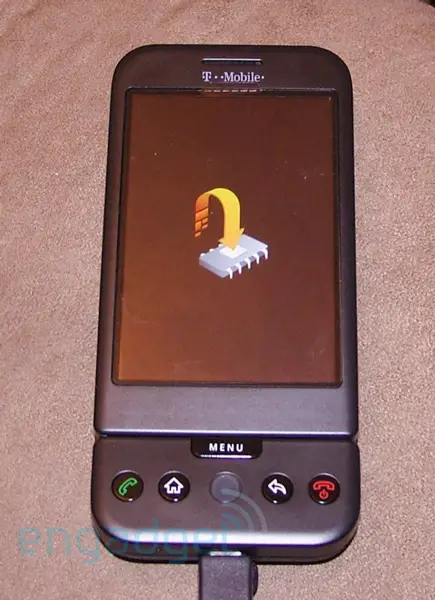
Tonight when I got home and turned on Wi-Fi my phone started going slow and freezing a bit when I was doing some stuff. Next thing you know I get a screen saying: System Update available: install now or install later. You may not use your phone while updating blah blah blah well of course I hit install now. The phone restarted shows some loading screen that shows a software package with an arrow to the phone, then restarts does some thing with some arrow to a microchip then restarts 2 more times.
Anyways,
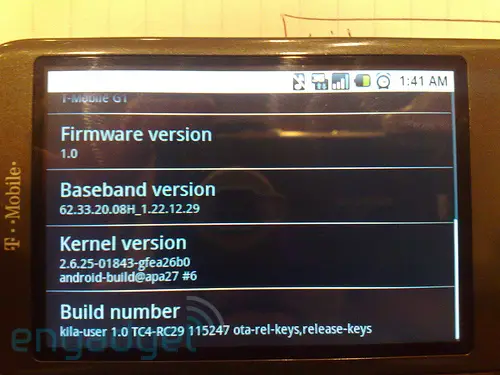
When I go to system settings to view the version this is what it shows:
Build Number:
kila-user 1.0 TC4-RC29 115247 ota-rel-keys,release-keys.So I guess they are just skipping the RC28 and going straight to RC29…
I wonder what is different between this and RC28.
Great update and great questions. RC29 seems to be a mystery update that we do not yet know exactly what it fixes. Follow the thread on AndroidForums as the story develops.
[News via Android Forums, Pictures via Engadget]







I don’t even have RC28 yet. I still have RC19. It would be nice if they gave you the option to “check for updates” and do the install yourself, rather than waiting for the update.
i’m with Jason – still have RC19. i’ve only had my G1 for a couple days. anyone know how long the typical wait is?
I haven’t gotten mine either…
I’ve had my phone since the 20th and still don’t have the update.
Probably the patch that was on the net couple days ago about security hole?
Dame i hating waiting just like i waited for da sidekick video ota update and i got ma phone da 20th
i have 20
The update fixes the power management problem.
I used to go from 100% to 0% (battery charge) in 10 hours.
After the patch, I have only used 20% for the entire day.
I don’t have any updates at all either! WTF man!!?
Here’s the list:
* Wrong field is focused when keyboard is openend in Messaging application: Now when the keyboard is opened, the focus will default to the compose (text entry) field.
* Cannot associate with WiFi access point using shared WEP key: Should now be able to associate to access points with a shared WEP key.
* Google Contacts/Calendar Sync (endless loop).
* USB storage: Now a USB notification will appear in the notifications area when connected via USB. Users must select to use USB Storage if desired.
* Email notification doesn’t disappear when the Email has been read (POP/IMAP Email client).
* New Email notifications not received (POP/IMAP Email client).
* Browser does not launch YouTube video when Settings > Enable Javascript is unchecked.
* WiFi & Bluetooth occasionally disconnect while charging.
* Support silencing of Email notifications (POP/IMAP Email client)
* Amazon MP3 fix for files with underscores (_) in the filenames
Damn i need this Update! i have most of these prob my batt last about 3 hours right know i think because of the Constant Contacts loop and i believe WIFI always checking if i keep canceling the Sync and turn WIFI off i can get thru most of the day on the Battery. Its really starting to wear on me
I think they should have all the updates posted in the android market.. With descriptions of each update etc… So then we can do a simple search and update when we are on wifi or have time.
You can ask your G1 phone to do a force “Check for Update”
You need AnyCut app from the market.
Create a shorcut on the desktop using AnyCut
– Select Activity
– Select Device Info
On the desktop select the new shortcut and scroll to the bottom. There is a button that will check for an update
Geo YOU ROCK DUE. I GOT IT!!!!
hey Geo, I followed your instructions and the phone said check in success, however I am still stuck with the RC19… Any idea why?
Yeah I’m having the same issue as Jaks. Anyone have any ideas why?
I have rc28 and for some reason it didn’t update as well
still have rc19. I tried geo’s method and it cave me a CHECKIN_SUCCESS but still have rc19…any help?
I have RC30, i never updated anything…
Tc4-rc30
I have rc30 and I never did anything
Wtf I still got rc8 any1 got any idea y
James, even I got rc8 :(
Here are my details:
Build description:
kila_uk-user 1.0 TC5-RC8 156470
ota-rel-keys,release-keys
Build ID
Tc5-RC8 /*(wtf!!!)*/
Build date
Tue Nov 4 16:28:35 PST 2008
Build Type
user
Phone type
dream
Product brand
tmuk
Build user
android-build
Build host
undroid14.corp.google.com
Linux Kernel Version
2.6.25-01843-gea26b0
android-build@apa7 #6
Mon Oct 6 14:13:36 PDT 2008
Baseband version
62.33.20.08U_1.22.12.29
—————————
I got ths info from “Device Info” that I could navigate using “AnyCut” application.
When I ask for check-in updates, it says CHECHIN_SUCCESS
Can somebody help me here.
FYI, I don’t have a t-mobile unlimited data plan (I just have their sim that can make calls and I access internet through wifi)
Thanks,
Arun
arun are u in the uk ? if so thn thats the reason y
Please i need to make use of my G1 becos each time i put it on it will tell me to login to my gmail side wish i will do and it will take me back to try again and the sim inside support data.
Please anybody knows about this should tell me what to do, becos it his not good carrying a phone you can not use around.
Thanks
hi guys only got my g1 phone i want to put a theme on my fone how do i do it…………do i need to update my phone if i do how do i do a update……… and what does it do to my fone wen updated