
 By
By 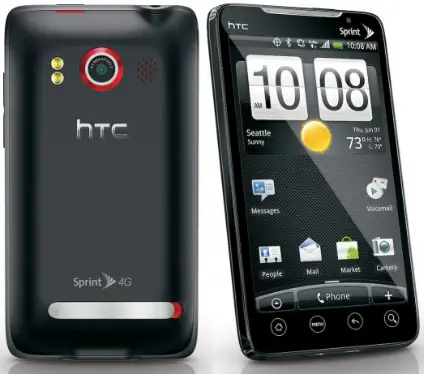
Why wait for Sprint to push your Android 2.2 update for the HTC EVO 4G over the air? Download it now and install it manually! The file is straight from HTC’s servers and the update process is pretty simple. Still, if you’d rather wait for the OTA version, feel free. It should be reaching your handset at some point shortly after August 3rd.
If you want to manually update, here’s how:
- Download the Android 2.2 firmware update. Download Link.
- Rename the file “update.zip” (make sure you don’t accidentally name it update.zip.ZIP).
- Move the zip file to the root directory of your EVO’s SD card.
- Shut down your phone and restart it in recovery mode by holding “up” on the volume rocker while powering up.
- Select “apply update.zip” and sit back as your EVO blazes into the future of Android.
It’s shaping up to be a great weekend for EVO owners. Enjoy your update!
[Engadget via Android Police]







Is this just like installing it OTA?
Will my stuff still not be erased?
Will it erase everything like the contacts and stuff from it if I were to update it manually?
It will take your ability to root, and previous exploits do not work with it. I wouldn’t risk losing root when you could wait a day for a rooted version.
Big updates always erase everything. That’s why they have you login that stuff from the boot up like google account and etc. That should bring your contacts back. So you never really lose them
@UniqueNate Sprint’s site said it wouldn’t erase anything. I’m not sure if it will or not by doing it this way.
I am having trouble updating; my recovery screen is an image of 3 androids on skateboards, and there is no “apply update” option.
Any success stories with this yet?
Im also having trouble, i get the same error message. its been renamed as stated.
Broken Link
I’m having the same issue as Ristar.
@Covert I don’t know if its down or they took it down, but I uploaded it to MegaUpload, if you guys can’t get the HTC link to work.
http://www.megaupload.com/?d=K1I338KV
Enjoy!
Link is broken, for the love of god someone post a mirror!
updating as i type this.. ill get back to you guys and let you know how it goes… ps im trying this on my stores evo.. if all is well ill do it on mine
These instructions are leaving out a step.
Follow this:
1.Download the Android 2.2 firmware update.(above)
2.Rename the file “update.zip” (make sure you don’t accidentally name it update.zip.ZIP).
3.Move the zip file to the root directory of your EVO’s SD card.
4.Shut down your phone and restart it in recovery mode by holding volume “DOWN BUTTON” while powering up the device.
5.Select Recovery Mode.
6.Hold the volume Up button and Power
7.Select “apply update.zip”
DOWNLOAD MIRROR: http://www.megaupload.com/?d=K1I338KV
So I downloaded orbiting don’t know were the root directory is. Can I get some help?
Do you have to be rooted to do this?
Same here Ristar. No apply update option.
Does anyone know what we are doing wrong?
“Move the zip file to the root directory of your EVO’s SD card.”
What does that mean? Is it simply saving it to the SD card?
1. it doesnt erase anything
2. it took about 15 min to do the whole process
3. it looks nice.. the lil things are what count such as the new font for the 3g signal
4. alot more new settings options.
5. ima have fun playing around with it..
6. seems faster
Update worked for me too. Did take a while lots of steps to complete the upgrade.
No data loss working as I would expect an OTA to.
Took a while to complete, thought it was hung at Spring 4G boot screen but it worked it out.
I’m beating yall to all the news today. Android Central is reporting that there is already a rooted version of the official 2.2 ready for download.
Nelson, as you are the only one that seems to have had success can you walk us through the process?
I am not able to apply the update. I am new to Android so I am not as skilled with it.
Please rehost the file you downloaded, link is now broken.
i downloaded it, now im ready 2 put to sd card but i dont know what to transfer. it isnt just 1 file. its several. do i rename all or just the compressed file thats named firmware. please help, anyone.
Hey nelson what file did you put it In? I need help please!
HTC removed the update, its not a final version. check out engadget for more info.
@nelson, I have the zip file saved. Where did you save the file in your phone?
HTC just tweeted, “Please be aware any update.zip floating around for EVO are not final and may cause problems. Official updates are coming OTA next week!”
So take that with heart. personally a couple days is not a huge issue. Also for you tether’s out there this update is suppose to nix the freedom you have (we all have) been enjoying. Supposedly. Also that link is the build Android Central has been playing around with today.
Here is the file they removed:
http://www.megaupload.com/?d=LCONCXF1
HTC advised that this is an ‘unstable’ release and may cause problems. They also recommended that we wait until the official OTA update. I think the update location was found before they expected, and they’re giving us the typical ‘wait for the official’ to cover themselves. What do you think?
Someone released a non-official version, if you installed it and your information was wiped, don’t blame HTC or Sprint. That is the problem of relying on information from “blogs”, they’re not reliable sources for ANYTHING official! As to previous Sprint/HTC updates, nothing has ever been erased. From engadget: http://www.engadget.com/2010/07/30/evo-4gs-froyo-firmware-now-available-for-download-manual-insta/
I’m just updating it, so I’ll let you know the result. Thanks to all anroid lovers.
I updated my Nexus One manually the exact same way. I manually updated from the first to the final build and never had a problem. Nothing was erased. Manually updating does the same thing as the OTA update. That was my experience with my N1.
Hey guys all my friends were trying to put froyo on their evos, so I decided to put it on my Nokia E71. Check it out: http://www.flickr.com/photos/47299486@N07/4845392916
Hey guys, I just installed android 2.2 froyo on my Evo 4G, it’s the 651.3 version, everything seems cool, I’m now going to play with it and see the big differences. thanks.
Note: the 4G screen takes little bit longer, that’s normal, mine is perfect know, I really liked it, flash is working, Camera, and the 4G are also perfect there are a lot of staff guys.
Don’t flash this update! HTC announced it’s not the official Froyo release for the EVO.
“Move the zip file to the root directory of your EVO’s SD card.”
Can someone please explain this step for me?
I managed to download the update from another site after being removed from htc. Official/complete or not, this installed without any problems. I’m running 2.2, I see Flash 10.1, move to sd, the flashlight widget, etc. The only thing that I had to do was uninstall Swype and reinstall it to work. Nothing else changed or was any different.
It isn’t final version and after some hours leaked, HTC was removed it.
So clicking on “firmware update” won’t do anything till Monday?
HTC did not say this isn’t the official Froyo. They said that it is not the final build, but is official. It was posted on their site for download. If you remember, it was said that some users would be allowed to download it as a test on Friday. Sprint’s website also says 7/30 as release date. I believe it is the fianl build. What could they do with it in 3 days before OTA begins on Tuesday?
so i take it you have to be rooted to do this manual install?
Though HTC says its not the final release, its still valid, so if you want to try it, go here: http://www.google.com/buzz/superlinkx/e4koy2G6j2E/Anyone-looking-for-the-leaked-Froyo-Rom-for-the
Phandroid should seriously update this story. It is highly misleading. I wonder how many people are still updating with the wrong version because of the incorrect headline.
You guys owe your readers better than this.
No, it does not erase your contacts and leaves everything intact. HTC removed it as it was not the final final release but everything seems to be in working order on my phone. It is blazing fast and my battery life have greatly improved.
I wonder if anyone noticed that the official HTC Twitter page announced last night that this isn’t the final ROM and could cause issues in the future?
I bet htc is dating that because they didn’t mean to leak it. Fear is a hell of a motivator.
I agree with bob.
great now they only need to fix the glue display issues and many other problems people have been yelling about . and i think this time around its shipping with a cheaper screen, I gave up on the EVO i think they dropped the ball on this one
i’ve installed it and don’t buy the ‘it’s no official’ thing. they are saying that to cover their ass. Do you really think that significant changes are going to be made in the final hour?
I read all the details of what the Froyo update will give Evo owners, and this ‘unofficial’ version gives EVERYTHING promised PERFECTLY.
Flash away, people. Trust me, this is official and the same that you will get OTA next week.
I installed froyo yesterday following the steps above. The upgrade went flawless and I didn’t lose any data on my phone (contacts, etc). My EVO was fast to begin with, but this update seems to have made everything run even smoother. Excellent upgrade!
with the official update though, the radio and wimax updates will be included.
Have fun installing “New Android 2.2!” from Bubba’s website l33thax0rs.bigupload.ru.cn/spyware-slipstream-android.exe I really hope that works well for y’all.
For those of you who are asking what it means to copy the zip file to the root directory of your SD card means, you better wait for the OTA update and then take it to your nearest Sprint/Radioshack/Bestbuy store and pay them to do your update. If you don’t know how to find the root directory of your SD card, you will be in a world of hurt trying to flash a ROM. Don’t even try. Wait.
@outcircuit: If it didn’t include everything, it would not have made it to their server for download. Did you miss that Sprint has release date of 7/30 on their website? And that they would allow testers to download on Friday? It’s the real deal. I am using it, and so are many others, with zero problems, and with all the goodies promised. Enjoy!
For those of you that still cannot figure this out, follow my instructions in comment #14. This includes a step that Phandroid left out.
Also, I installed the update last night. The new features are all there… however, I do believe that this might not be a final build. There seems to be a bit of a lag in the system that was not there before. Also, text messaging seems to have taken a step backwards. Try it and see. It’s kind of annoying….
Ok I figured it out. To move the .zip file hit move, then go back one screen to SD card there should be Ur download file on the screen. This screen is the root directory so hit menu edit paste. Then restart Ur phone. I’m a noob and just installed it and it works. Nobody else explained this and it took a while to figure out so I figured id help everyone that ran into this problem
Interface doesn’t look anything like videos I’ve seen of froyo running on nexus or rooted evos….this update isn’t as exciting as everyone is making it out to be
I installed it last night, using ChriZ instructions. The only that confused me was after step 5. After you select recovery mode, you get a screen with a phone and some red type of triangle on it. I waited for something to happen, then finally realized nothing was going to happen unless I did something. So I moved on to step six, which is to hold the volume up button and the power button. Everything from there ran pretty smooth. One other note. When the phone finally reboots, the sprint boot animation loads and the “4G” text stays there for a little while. Maybe a minute or two. It wasn’t a problem for me. I’ll play with it and see if everything is cool, but last night I went to cnn.com and funnyordie and I was able to play the flash videos (OH YEAH!).
Not sure if this took, so I’m posting it again.
==================================================
I installed it last night, using ChriZ instructions. The only that confused me was after step 5. After you select recovery mode, you get a screen with a phone and some red type of triangle on it. I waited for something to happen, then finally realized nothing was going to happen unless I did something. So I moved on to step six, which is to hold the volume up button and the power button. Everything from there ran pretty smooth. One other note. When the phone finally reboots, the sprint boot animation loads and the “4G” text stays there for a little while. Maybe a minute or two. It wasn’t a problem for me. I’ll play with it and see if everything is cool, but last night I went to cnn.com and funnyordie and I was able to play the flash videos (OH YEAH!).
The update works great except the only problem that I have found so far is I get a force close while trying to open the NASCAR app.
After installing the update mentioned above to my non-rooted EVO, my contacts were listed by first name instead of last name, first name as it was before the update.
Haven’t noticed any increase in battery life. I do like the ability to see the FULL VERSION of the internet with flash and flash video. :)
Kevin
Ok, so I’m an expert on apple products turned EVO fan boy :D
But my question is, if I install this and its not the same as when they do release the ota, can I patch theirs over mine?
I know how to see the folders but not sure what one is the root folder I cant seem to find anything that says root. Once I find that I will be fine
You are so right about not installing the update
56. MVtom wrote on July 31, 2010
For those of you who are asking what it means to copy the zip file to the root directory of your SD card means, you better wait for the OTA update and then take it to your nearest Sprint/Radioshack/Bestbuy store and pay them to do your update. If you don’t know how to find the root directory of your SD card, you will be in a world of hurt trying to flash a ROM. Don’t even try. Wait.
I downloaded it after watching the google scroll of latest evo posts and thought better of it. Will be handing this phone to someone this week. OTA would be ideal.
@MVtom, you don’t have to flex nuts man, its uncalled for. Not everyone knows the Android system as well as you apparently do.
So is this the final version that just got leaked or will it actually give me problems down the road?
B basically I’m wondering if I can do this and just replace it with the one from sprint? Please lett me know!!
i got the early update and love it
enjoy
http://thepiratebay.org/torrent/5733160/HTC_Evo_4g_Froyo_Update_Android_2.2
So I downloaded the ‘update.zip’ file yesterday but could not move it to the root folder on my EVO. I was using Astro to do this and after an hour of trying to cut/copy/paste, I realized that the root folder display the permissions as d–, meaning I don’t have rw permission. Then I tried to root my evo by visiting unrevoked.com but could not root it as they wanted me to download something for either windows, linux or mac! So eventually I realized that I’m not as smart as I think I am and deleted the ‘update.zip’ file as it was 70MB+ in size. I’m now waiting for tomorrow.
Hi everyone, so I have tried numerous of times on my evo and on my wife’s evo… I get to the screen where it shows the phone and the caution sign.
then at the bottom when I push up vol and power btn, it says
E:Can’t open /cache/recovery/command
then when I try to apply sdcard:update.zip
it says
E:signature verification failed
installation aborted.
Please let me know what am I doing wrong or am I missing a step?
thanks
Some of you guys are coming off hard core on the noobs here…they just want some of the 2.2 goodness! Help them out if you can. We all need a break sometimes.
For those asking, the root folder is just the drive of the sd card storage (so just save the update.zip file there). The signature verification issue i’m not sure about…sorry my man. After getting the triangle ! when you select recovery hold the power button and the volume up button together and the apply update.zip option will availabel for selection. Select it and follow the on screen instructions and you’re cool.
For anyone interested in learning much more about installing ROMs, Rooting, and overall EVO knowledge, some great sites are:
http://forum.xda-developers.com/showthread.php?t=709271
http://forum.xda-developers.com/wiki/index.php?title=HTC_Evo_Guides_and_Tutorials
I personally learned a ton from “Fresh” from his website: http://geekfor.me.
Good luck!
So I figured out why I was getting that signature verification error…. I was using my mac pro to do everything I used my phone to download the file and astro to change the name and so on. It worked flawlessly..
so are u people downloading it to your comp n then doing a sync to your phone using that htc sync app?
The flash keeps crashing . and i am not able to pay for the apps. Anyone has this issue
a problem i have come across is that i cant open any links from my gmail account or links from facebook. can anybody help me?
i am having problems opening up any links from gmail and facebook. can anybody help me?
i am unable to open links from gmail and facebook. can anybody help me?
all updated with the OTA update the obly problem i have is my web browser will randomly close and while im here does anyone know where I can get more home screens? I have looked around dont seem to find any but know they have some out some place,
The link does not work and I can not find the 2.2 offical update file any where can any one help?
im pretty much a virgin to android and recently got my evo. however my brain has been a sponge in the past few days.. reading up on tozens of threads trying to get my evo at it’s best. my main goal at the moment is to root my already updated 2.2 firmware. will i be able to root that? or am i kind of stuck until further hacking is readily available? ive only seen threads on rooted 2.1 upgraded to the prereleased (at the time) 2.2
broken link
Hello…
Maxthon International’s Android and Windows browsers work together in a cloud computer environment to share data instantly and automatically. Changes made in favorites, passwords, and contacts in one browser are reflected in the other browser immediately. We would like to send you press releases from time to time. Do you have an email address I can use instead of this form?
Thanks,
Ron White
[email protected]
210-683-1444