
 By
By While the Places Directory by Google has been available in the Android Market for quite some time now, Google has revamped the concept of a local directory and packaged it directly into the latest update to Google Maps, version 4.4, available today. Complete with new icon and now simply known as Places, the standalone application with a revamped UI offers users the ability to quickly search local businesses by category or by entering the name or type of establishment you wish to discover. If your search for “sushi” returns a favorable result, you can quickly access directions and other location information through Google Maps.
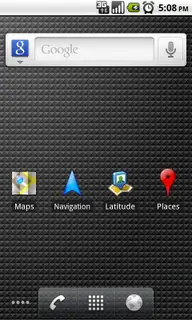
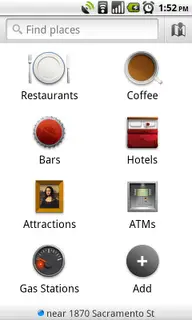
Along with the ability to locate and get directed to businesses, Place Pages now feature even more helpful information, from compiled reviews to photos to menu details, pricing, and parking info. Hours of operation and a compass heading with your distance from the location make it easy to locate a nearby place that is sure to be open for you night owls or early risers.
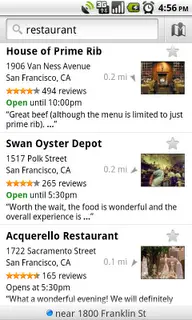
If you have never used Places Directory, now is your chance to maximize your local search results. It isn’t quite Yelp, but Google is no doubt trending in that direction. We are sure future updates will include Locale integration that will let you get a better sense of exactly how poppin’ that trendy upscale bar downtown is compared to your local watering hole on the cheap.
[via Google Mobile Blog]










I think this negates the necessity to have the Places Directory installed. Interestingly, that came through with an update this morning, but upon launching the app, it’s impossible to get past the splash screen asking for permission to access your data. And now, Google has updated maps to include a “Places” shortcut in your apps, and the original Places Directory has disappeared from the Market, so I just deleted it anyway. Little bit messy, Google, the way you worked that one :)
I dont see the places icon on my app drawer?
Way to go guys! Never mention the tipsters!! !@#@)$#ds!
Does this mean I can uninstall Places now? I’m sure a lot of other people can empathise with the pain of not having 2.2’s apps to SD feature, and having to pick and choose applications. Google’s are the biggest applications that I have, in terms of storage.
i am not seeing Places either? and yes my Places directory is not allowing to go beyond the ” Allow” window….weird.
I needed a reboot of my phone before it showed up. Same thing happened when Google added Navigation last time round. Didn’t show up until I restarted the phone.
How do I access “Places” within Maps? I have 4.4 and I just don’t see it.
For all those who are not seeing the ” Places ” make sure you uninstall the Places directory app if you have it, if not simply just turn off your phone and turn it back on….boom its there.
So can anyone verify that this is truly meant to replace Places Directory?
@Snupples
I haven’t used it yet, but it looks like it.
this is a great update
no update for me i only have 1.5
@mikeeeee so install a newer rom.
when 4.3 came out i wasnt able to update for some reason. Lets see what Happens with this one!!!
can’t find google maps in the market, i have Nexus One running the latest Froyo
This is sweet. Here’s a big difference between Apple and Google. Apple tells you what software to use. Google makes software you want to use, and just releases it like setting a little bird free.
@uprooted.. really? “setting a little bird free”. is that the best metaphor you could come up with?
Just wish Google would update the listings in Places more often. Some of the places that come up for my ‘hood have been closed for years.
@jo, No, I didn’t think most people here could handle anything more esoteric that than. One writes to their audience.
hi! can anybody post a link for download? i’m from venezuela and we never have the updates of google maps!
MY MT3G WOULDNT UPDATE TO 4.4!!!!!
Nexus running stock 2.2.
Updated fine, needed no reboots.
The colors on the satellite map seems way more vivid now, much better.
:-)
I’m really, really liking this update. I can see myself using this feature more and more.
@LaMarcus, did your phone show an update was available? If not, try to reboot your phone. I got the notification (also running a MTG3). I had to wait a bit before the separate Places icon showed up, but it did (didn’t have the separate app installed)
Is there a way to uninstall the Places and Latitude apps? I will not use either of these “clutter” apps, and would rather have them off my phone.
well I’m pretty good with my phone and I can’t find this feature ANYWHERE in Maps???
sweet, I found it!!!! now I just need 2.2!!!!!!
I updated to 4.4 and verified I have the correct version. I see new apps for Places & Latitude in my app drawer, but I don’t see how Maps is any different. When I start Maps, I don’t see any link or anything to get me into Places. I have to start Places manually.
Also, when I used Navigation, my endpoint showed a black & white checkerboard pattern on most of the screen rather than a picture of my destination. Did anyone else have this problem?
have the HTC Evo i can not find the Places icon on my phone!!!
My mobile is HTC Desire runing Android v2.1. I had Places Directory and Maps v4.3 installed update to Maps v4.4 and could not see Places. Rebooted mobile, uninstalled Places Directory and rebooted mobile – still no Places or Places icon, what now?
Answer to above. On HTC Desire. Had to add Places icon manually alongside Maps and it now works integrated to Maps and Navigator. Phew!
Dave Young, How did you manage to add the Places icon manually?