
 By
By Well it seems Samsung has released the Moment’s open source zip files. Samsung has been quiet about the Moment as well as Sprint. Wonder why?
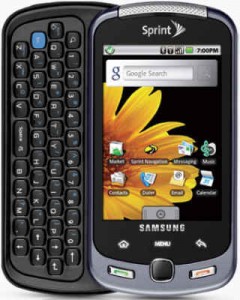
Well hopefully with this nugget of information someone can get it rooted and get it going. Android 1.5 is nice and all, but 1.6 is a bit better and 2.0 seems to be awesome.
Can’t wait for the people over at XDA to manhandle the source code and root this puppy.
For a review of the Moment click here.

Unfortunately xda is HTC-only or it would have been rooted by now. These files have been available for a couple weeks. I’m loving my Moment. It is the best Android phone available to me (VZW plans are ridiculous and t-mo isn’t offered here).
The open source files for the SPH-M900 have been out for over a month. They were released around the same time as the Hero source code.
Are there any sites that do heavy modding of the Samsungs like XDA-Developers does to HTC?
I would have to agree with Andy about the awesomeness of the Moment. My roommate just bought the Moment last week and it is a powerful device. Smooth operation, beautiful display and great form factor. I wish they had this on Tmo but at least I get 1.6 on my Mytouch. I did notice that a few apps seem to not work that well on the Moment. Why is that?
I wish there was an XDA for Samsung..
What is an open source file and what does it mean for a phone to be rooted??? I would consider my knowledge on technology above average, but I just havent read much on what it means to root your phone. I have the Samsung Moment and absolutely love it. I love the 800mHz processor and I’m really looking forward to a 1.6 or 2.0 update.
Any input would be greatly appreciated… btw I love this site!!
Try this: http://midnightchannel.net/blog/255-how-to-root-the-samsung-moment.html
I just wish they’d release a version of this phone for T-Mobile. It’s the only 5 row qwerty keyboard android phone since the G1 … which makes it the only acceptable successor to the G1.
(ideally, they’d make versions of it for all 4 of the big 4 carriers)
Good site on the moment (link to the rooting thread):
http://www.samsungmomentforum.com/how-to/root-access-%28finally-achieved!%29/?topicseen
Good Moment forum (link to rooting thread):
http://www.samsungmomentforum.com/how-to/root-access-%28finally-achieved!%29/?topicseen
Hmmm… sorry for the double-post, having technical issues
If Samsung keeps releasing hardware-superior Android phones, I’m sure a version of XDA will emerge. It’s just that Samsung has only just gotten into Android, while HTC was an early adopter. I think you’ll see a lot of hackers and programmers interested in this phone.
@johnkzin
Am I missing something, or does the Moment only have 4 rows?
I think the Moment was rooted a while back… where you been man?
@Ricky
You are not missing anything.
The Moment only has 4 rows. The G1 had 5. Space, Symbol ALT and zoom keys, made up the fifth row on the G1.
Most phones are using a function key to enter the numbers and this has a row with numbers, johnkzin overlooked it.
HTC Hero!
I am wondering if they are planning on any apps or widgets that will change the setting for the ringers, I came from a crackberry that allowed me to assign a different ringer for everything,yahoo, aim, text, mms, each different email, tasks, calander, i mean everything, also different ringers for calls from contacts list and non contacts. I would really really love to see that on here, this phone is great so far.
I dont know the name of the apps, but I do know that there are free apps in the market that will allow you to assign diff audio file types to individuals in your contacts and more.
@Mulch. Get Ringdroid from the Android Market.
Anybody heard of an app for having one stream for text, email, missed calls, etc. like the Blackberry. My Moment is in the mail on it’s way and I’m retiring a Curve 8330. I really like the one stream on my Blackberry.
I just purchased the Moment last night at the local Sprint store. I switched from VZW due to the HIGH COST of their plans. However, so far, I’d much rather be able to use my Storm which I loved, except for the sluggishness created when using multiple apps. I am a Realtor and hopefully I’ve made a good choice by purchasing the Moment as an alternative to my Blackberry Storm. (I wanted a large screen with touch features of which I don’t believe that Sprint carries in its Blackberry lineup. Anyway, the one BIG feature that I’m having issues with is this…I cannot seem to figure out how to enlarge my fonts for all features of the Moment. I was able to read emails etc on my Storm with the enlarged fonts. Yes, I wear reading glasses, but at least I wasn’t required to wear them while using my Storm. Any advice would be most appreciated as to how to enlarge ALL of my fonts on the Moment.
Oh and lastly, does anyone know how I can “transfer” my list of over 500 contacts to my Moment from my Blackberry storage file? Thanks in advance!
@ Marty
Set up a Gmail account on your PC and sync all your contacts to gmail acct. On your Moment you can now sync all your contacts to the Moment by activating your gmail account on your phone and it will ask you to sync all your accounts to your phone?
I am loving my moment so far! Was curious if anyone knows how to put text files on the micro sd. Wanting to put my resume on it so I can access it to send in emails when online applying for jobs. Please help!
@Cassandra- save it as a draft in your email account. It saves space on the sdcard and saves you time from having to compose and attach every time you want to send it. And you have access to it from every pc or phone with a data connecton. But to access your sdcard plug in usb cable, slide down notification bar, touch new alert about usb being connected, open device on pc, and transfer away.