
 By
By With the Motorola Droid running Android 2.0 you’ll have access to none other than Google Maps Navigation, but as you saw yesterday, it’s kind of hard to use if you don’t have a car mounting solution in place. Fortunately Verizon Wireless and Motorola are selling a Car Mount, which they officially call a Phone Holder, and are selling it for $29.99:
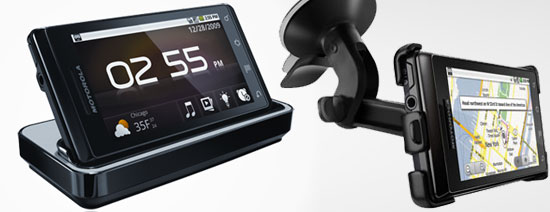
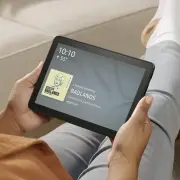
They’re also selling a multimedia station which turns your phone into an alarm clock and weather display for a bedside sort of experience. Both of these accessories use magnets to determine when/if the phone is docked and your Motorola Droid will automatically enter either “Car Mode” or “Multimedia Mode” when it is connected. There is a LOT of money in accessory sales and VZW/MOTO should do pretty well with these.
There is no doubt I’ll be buying the Motorola Droid Car Mount / Phone Holder but is anybody planning on buying the Multimedia Station? It would be neat to have but it all adds up and dishing out an extra $30 when I’ve already got an alarm clcok sitting there? I think I’ll pass on that one…
Here is what Moto has to say about each…
Phone Holder for DROID by Motorola:
Phone Holder for DROID by Motorola attaches to your windshield or dash and lets you position your handset for easy access and viewing. Great when using yuor phone’s navigation and map applications. Quick attach and release. Includes a Rapid Car Charger.
Multimedia Station for DROID by Motorola
Turns your DROID by Motorola into a multimedia experience and doubles as a charger. Displays photos and movies, plays music, shows weather and time, and works as an alarm clock. Syncs your media to your PC via USB cable (included).
[Via Gearlog]



Sweet! I’ll take two Media stations and Three Car Docks for Christmas please!
I agree thats way to much for another alarm clock, even as pretty as it is.
I have trusted my wife with the alarm clock for to long. and using my WM phone as an alarm sucks. This looks like it will be 1000 times better.
Buy a piece of cardboard, a couple magnet and you get your alarm clock! http://www.engadget.com/2009/10/28/how-to-hack-your-own-droid-dock-with-magnets-and-cardboard/
I to would like a media station. I use my voyager for everything, calender, alarm clock, mp3 player, etc… With this media docking station, not only will it be appealing to look at for pics, weather, and even movies, I won’t have my phone just laying there. Can’t wait to upgrade my phone to the Droid…
will these two items automatically charge the phone?
I think the “multimedia station” would be an easy way to charge your phone at night. And really, if you guys are willing to dish out $30 for internet every month, whats another $30? Or put it this way: Would you still have bought this phone if it were $229.99, and it included the dock?
I think I recall engadget saying that the navigation interface was accessible via the software, even without the phone holder. The Multimedia interface, however, was not.
While the Droid looks nice as alarm clock, I’d be worried about hitting it too hard in the morning when I want to snooze and breaking it somehow …
If the droid ever makes it to Canada I wounder if the accessorys will as they seam varry “Verizon-ised” maby im worng.
Is the Multimedia Station for Droid useful? It depends. Besides the USB output, does it have RCA line-level outputs so I can connect it to my stereo system? If so, now that would be useful to me.
accessories are nice and all but when will we find out service plans….verizon has the worst rates around and i would love to switch but they are so over priced it makes me want to stay with tmobile because for the money you get the best plans…
anyone know anything yet?
If I get the droid (I may hold off for Sony Ericsson), I would use the dock primarily at work for music.
i will be getting both. i’ve used my phone as my alarm clock for years and now it will finally look like one ;P and charge at the same time too
Poor Chumby is being one-uped again:
http://www.chumby.com/
The car dock is a no brainer, but the multimedia dock… In a different economy when I had a little more disposable money I’d be all for it. I use my cell phone as my alarm clock just about every day, so it’d be super worth it, but I don’t have the money these days especially, when I’m buying a $200 phone, another $30 for a car dock, and getting a $30/month data plan.
Not to mention the magnets thing.
I bet someone will come out with a after market dock on the cheap soon.
Oh, and I also wanted to mention that I’m really disappointed that this “multimedia dock” has no tv-out or anything like that. I was hoping for a direct port on the phone itself, and when phone pics came out and it didn’t seem like there was one, I was hoping this dock would do it for me.
I know it’s still an uncommon feature even among high-end phones, but being able to watch videos on a tv from my phone would be a hugely cool thing for me, whether they’re things friends, family & I recorded, youtube & internet videos, or even tv/movies.
@stef The multimedia dock will. Unsure about the car mount.
I think the multimedia station will make a nice travel alarm. I’m going to try one.
“I bet someone will come out with a after market dock on the cheap soon.”
Agreed
I actually don’t care about the car dock but I would love to get the multimedia dock. And I’d love it more if there were sound/video out ports. My problem is that I want three of them. One for my bedroom (alarm) and one for my office at work and home. And that starts getting pricey…
@phases
Car mount doesn’t, but how hard is it to just plug in the cable?
It looks at though I should be able to get two of these on a family plan for $120 a month. Am I reading that right? Unlimited text, unlimited data and 700 minutes. Please let me know if I’m wrong on this. The car dock is a no brainer. VZW is no different then any other carrier when it comes to trying to make a bigger buck on accessories.
Everyone saying how much the dock cost when a simple do nothing iphone dock cost $50.
$30 seems like a good deal to me.
The car mount comes with a 12V charging cable.
Sully: you missed the very last step. Smartphones plans require the additional $30 dollar media package. So add $60 to that $120. Their rate plans suck when compared to Sprint at the moment. But I will be heading to Best Buy this afternoon to pre-order two! Verizon service is the best in my area.
Because I’m getting my droid for 99 bucks from upgrade deals, both of these are worth it to me. I also use my phone as an alarm clock. The dock will provide an easy way to charge and sync the droid. And although props to engadget are due for their cardboard hacks, nobody is going to rely on a piece of crap like that. It would run you close to 30 bucks for a sturdy setup anyways, but then you’re out a charger and syncing ability.
I’ll be getting two multimedia docs (bedroom nightstand and office) and a car doc. Does the multimedia doc have speaker connections? If not, then how in the world could you really call it a “multimedia dock”? For the bedroom, I would totally like to hook up a couple of small speakers and have a little Pandora station there. Now… what are the odds that a slingbox app would get build for the thing to operate over wifi? How cool would that be?
I would pony up for the multimedia dock and replace my alarm clock… if I were a VZW customer that is.
Hell a cable and car charger usually costs $30 anyway. It says the car mount comes with one so that is a pretty good deal
I’ll take one of each, please.
Brad, the $60 (well, 1/2 of the $120 family plan for two) includes unlimited data, so no additional $30 “media package”, unless I’m reading it wrong.
Does anyone know if you can place the phone in the alarm clock mode w/out the dock (via the GUI)?
I’d buy the alarm clock docking station. It loks nice, and my girlfriend hates my blue led insanaly loud fm radio alarm clokc. She’d actually give me this thing for christmas if at any rate I can get the Droid in Europe before that date. Having said that, will it even come to europe anyway?
Magnets you say? So, if I wanted to, say, make a makeshift media station out of cardboard and duct tape then find the sweet spot on my Droid that induces that mode, I could just set it in the cardboard and plug the charger in and I’d be set. :B
@ThinkOpenly
That is not true sadly you still need an extra ($30 bucks a month) data plan with this phone (which is the same as a blackberry or iphone data plan) even with your current plan with unlimited data. I went in to the verizon store today to find that out and was disappointed that I was wrong too.
I’m definitely getting both too!
It’s called EBay in 2 – 3 weeks for them cheap! =D
The Car Mount that I purchased at Verizon this morning DID NOT include a charger. Even though it says it does on the Moto website. I’m pissed. They’ll be hearing from me.
And it didnt come with mine either. WTF.
unfortunately, i have just found out that you cannot make a call through a bluetooth device hands free with the droid. you have to go to the screen of the droid and use the voice dial, say the number, and then click on the number or name that shows up on the screen. this is horrible. how could google let that slip by. you can answer an incoming call with the bluetooth device, but not make a hands free call. really, really bad. this is a danger and should be fixed immediately by google.
To SfStan:
you say “unfortunately, i have just found out that you cannot make a call through a bluetooth device hands free with the droid.”
I have the droid, leave it in my pocket and make bluetooth calls on my Nissan built in system without touching the phone and without a problem.
Talked to two VZW reps, one phone, and one store, both say the 30 car mount does not come with a charge cable.
I’ve got a third party fabric belt holster with a magnet closure. I noticed when I remove my Droid from it the Droid is in Multimedia mode. :)
I have a hardcase on it and niether of the docks can hold it with the case on. I don’t mind poping the back off for the car if I use Navigation, but the dock is a no go for me. Sooooo, I decided to do it another way…
There is an app that unlocks the MediaDock’s function called Dockrunner. Get that coupled with the Screenmode widget (to easily switch between the display sleping and staying awake). Both are free and available on the droid market.
Then simply plug in your wall charger and rest it against something and viola! $30 saved. I used a stack of books to prop it up with the plug hanging off the side and
You can have the same functionality of the Multimedia Station by downloading the DockRunner app :)
Where did you find the Car Mount on sale at motorola website? The one I found still says “Coming Soon”. Does anyone know whether or not the car mount sold by Verizon comes with the car charger like the one at Motorola?
Does anyone know if the Droid will fit in these mounts with the protective plastic case? The fits look pretty tight in the pictures.
Eric A. – the phone will not fit into the mounts with a case on the phone.
Well, just to let you know, if you get the vehicle mount from Verizon…it does not come with the charger…but, Motorola’s site says it does, however, they don’t even have them…aren’t they the manufacturer???
Hey, does anybody know if the ‘protective screen films’ are a standard size, maybe like an ipod touch or something?
Just got the car mount and it did NOT come with a car charger.
to Bnoyz, u can get ZAGG invisible shield that is custom fit for the phone. it is better to order it online from zagg’s instead of buying it from best buy or something. cheaper from zagg’s.
@Bnoyz and others – I highly recommend bestskinsever.com for a protective skin. Much cheaper than others and does the job wonderfully without bulking the phone.
@kyle and Sam – I’m not finding Dockrunner anywhere on the market. Searching via Androlib and Androidzoom. I found the “Car Mode” app, but it only changes the options for speaker phone and doesn’t actually put it in car mode.
Love the Droid…don’t love the fact that every time I want to use the docking station I need to take off the cover I have protecting the phone. Is there a skin/cover out there that will work with the docking station?
Got my new Droid window car mount. VERY handy. The only thing it needs is a hole where the camera is so you can take video or pics while you’re driving. Would be handy for documenting a trip, capturing the license plate of the jerk that caused an accident and left, etc.
I to had the car mount, did not come with a car charger I bought that separatly. Does anyone know why the multimedia station is not charging my phone? Is it a setting or something I’m overlooking? Help!r
Also,can anyone help me use my droid as a modem? How does that work?
Leesh: The only way to use your phone as a modem is to root the device and apply an app that allows you to “tether” your phone to a computer. A couple of points though… The tether app has not yet been created for Droid and rooting will violate your TOS agreement and manufacturer warranty. Also, tethering a lot will increase your data usage and Verizon will probably bust you. I am going to root my device once tethering becomes available, but I only want it for emergency situations.
Does anyone know if there is an app to create a custom replacement screen for when the Droid is mounted in the car dock? I would like to remove the repetitive functions and replace them with my multimedia options (Listen, Mixzing, AR Radio, ect). The car home screen is nice looking but it should be customizable.
Re; custom screen for when in a dock (Car, Mulitmedia etc)
Have you tried GDE home page app? You can have 7 sides on a rotating cube of home pages. I would think you could set up different home page screens for your different uses or locations.
Also, check out Dolphin’s browser instead of the default browser.
Sorry but the suction cup mechanism is just plain stupid for this car mount. I stopped using it on my Garmin after the 100th time that i needed to pull the unit off the mount and pulled the suction cup off the windshield instead. The suction cup just doesn’t last through temperature changes, moisture changes etc.
Get your act together, Motorola — copy Garmin’s very smart interchangeable suction cup and “sandbag” base for the car mount. You’ll make VERY happy Droid owners who will tell two friends and so on and so on.
You’re welcome.
Does anyone know if the droid still fits in the multimedia station and car dock if you have a hard case on it?
http://www.bestbuy.com/site/Motorola+-+Vehicle+Mount+for+Motorola+Droid+Mobile+Phones+-+Black/9656931.p?id=1218139146665&skuId=9656931&st=Droid&cp=1&lp=7
When the car dock is used, and I suspect the multimedia station, you have to take the hard case off for the phone to fit into the mount or dock.
Has anyone purchased a car dock that actually came with the car charger. The one i purchased from Verizon was only the car dock.
Just to let the ones know about the tethering. It can be tethered and without ROOTing the Droid. Just go to PDAnet and follow instructions for the Android phone. I have tried with Win 7 and Windows Vista. The tethering works fine using the Droid and Windows Vista. Good Luck
Ill give ya 30 bucks for the pair, but 30 bucks each is way too much, I can ghetto rig my car setup and have the same alarm clock I got when I was 18 and it wakes me up fine every morning, nice try Motorola.
@KMD
“Sorry but the suction cup mechanism is just plain stupid for this car mount. I stopped using it on my Garmin after the 100th time that i needed to pull the unit off the mount and pulled the suction cup off the windshield instead. The suction cup just doesn’t last through temperature changes, moisture changes etc.
Get your act together, Motorola — copy Garmin’s very smart interchangeable suction cup and “sandbag” base for the car mount. You’ll make VERY happy Droid owners who will tell two friends and so on and so on.
You’re welcome.”
You pulled off the suction with the Garmin but not the Droid correct?
Does anyone have any idea when the Car Mount with Charger will be available? I just called Motorola, and the call center in India was very little help. I have a Verizon Car Mount as well as an extra charger that I could use, but I’d certainly like something a little cleaner that wouldn’t leave cords running all over my car.
Listen up. When my wife and I got our Moto Droids the guy offered us a car charger, case, and 2 packs of skins for free. If anyone doesnt have a droid and is looking into getting one. Tell them a friend got that deal and if you could get the same kind of deal you’d possibly buy one as well. It worked for me! Also I noticed there are car mounts on ebay. Not sure which one i should buy. Standard one or one of the cheapies…Can anyone give me their review?
Have the car mount. Won’t charge the phone when the phone is in the mount. Starts charging when it is removed? Battery will drain when using it as a gps.
I have the multimedia station-love it! I now want the car mount. I already purchased the car charger when I bought my Droid. I just wish I didn’t have to remove my hard cover! They should have considered that…
i love car mount thats easy way to handled it
Don’t use the multimedia dock as an alarm clock at home. I tried that too, not much use. Instead, I use mine at work, in bright mode. It sits there looking like an innocent clock to the naive observer, but it actually allows me to see if I have texts, email, the weather, allows me to discreetly listen to music via headphones or the speaker, and even can serve as a sweet little digital photo frame. The home button immediately hides whatever I am doing on the phone and takes it back to that innocent digital clock. Plus, it’s charging.
There are many Droid Dock Plans on YOUTUBE one of them is only 20 Cents and 75 Cents for a plastic dock. The guy even tells you how to make one with nothing more than a white board magnet and plastic using an oven.
http://www.youtube.com/watch?v=KMuhDWLAMKQ&feature=youtube_gdata
And it Works!
My docking station is no longer charging my droid. It worked for a while, but not anymore.. Help! I loved the alarm clock!
Right now verizon has a deal and it is a no brainer! There is a $40 instant rebate in their online store for the combo pack that includes the card dock, car charger, and multimedia dock. This means you get all 3 for $49.99, not to mention buy one get one free droid phones.
if you need some phone or IC, pls check our website
I have nothing but good to say about the Droid. When my husband bought my droid for me we also purchased the car mount. GLAD to have it. We also got the car charger and leave it in the car for when we need it. The only alarm clock I use is my droid so I am in the process of ordering the docking station now. As for the price – Why Not? we spent some big money on the phone might as well get the whole package and be happy :)
I just sat my droid in the right side of my mack book and the multimedia station turned on i guess mac knew this was coming
I mounted the multimedia station with two sided mounting tape you buy at Walmart for (6 bucks)…I then stuck my car charger in it so that it charges my droid while I drive around. I put it in a place that I am able to nativate through songs and aps. I dont understand why people would buy the car mount as it doesnt stick to the window very well and if you want to get you phone to charge it is a hassle trying to find the right cord because I have 3 outlets, one for my phone, one for my gps, and one for my radar dector. I hid all the cords so you dont really notice them. I think all you people that are upset about the car mount not charging your phone you should just mount the multimedia station instead. I perfer my GPS over the droid because i hate that female voice giving me directions..
Actually if you plug your car charger in while its in the car dock it does charge. Also the car mount suction cup works amazingly you have to use the pressure switch for it and it will not come off :)
And to heather u can change the gps voice there are several different options
Hey COSTCO has a package with Media station, car mount, rapid car charger and usb w/ plug for 39.99
I have a charging station that will also charge an extra battery. I love it. Alway have a fully charged battery when I need it.
I have the multimedia station and love it. The alarm clock is ok, but I love that the display is not as bright as a regular bedside clock. It also uses my existing charger, so it is ready to go every morning when I get up. The station can also be set up as a simple picture frame which uses pics in camera as a slideshow.
If you use the car mount can you still listen to the radio?
The motorola droid dock has got a great review from the common the public. This gadget is absolutely very user friendly.
What do I do with my droid when it is on the dashboard dock and I have a phone call. I need to answer the call but I don’t want to loose my GPS and I’m on the interstate.
Help
Steve
help appreciated