
 By
By 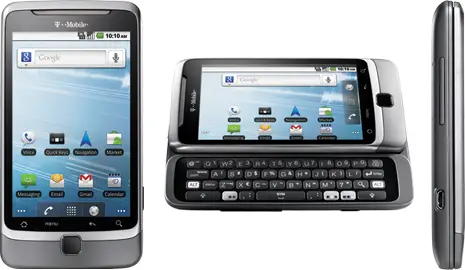
Still waiting on Gingerbread for your G2 from T-Mobile? If you’d rather take your chances on what appears to be a leaked build of the update posted on T-Mobile’s community, you probably won’t have to wait much longer. It’s said that this update is the same one that was appearing on some refurbished G2s, so there’s a high chance that this is as close to final as you’ll get. Install at your own risk, as usual. Instructions and impressions from the benefactor are below. [via Android Police]
There’s a few cons about the leak like:
– No 3-botton reset.
– Long pressing the camera buttom makes the phone vibrates.
– You cant root the phone once this is done. There’s no way to downgrade again to 2.2.
– Some people had reported problems with their backlight keyboard (I dont have any)
However, the pros outweights the cons:
– Better radio (No, not AM/FM radio)
– Better audio codecs
– Faster boot up… (under 30 seconds on my phone)
– Faster response.
– Better GUI
– Bug Fix on bluetooth and Wifi.
Instructions:
– Download the file.
– Save it on you SD card on the Root, not on a folder.
– turn your device off and then on by holding power on and volume button together. This will boot you into t-Mobile G2 bootloader.
– once your device boots into the bootloader, it will automatically search and detect PC10IMG.ZIP file. Please remain patient as this can take some time.
– Once it detects and scans the file, you will need to press the volume up button on your phone to restore you device. This will again take 5 to 10 minutes so patience is advised. During this process, the phone will reboot and and resume installation of stock firmware.
– Once the flashing / installation is complete, press the power button in order to reboot.
– Once you have completed all these steps, connect your phone again to the computer, mount SD card and delete PC10IMG.ZIP file.








-___-
cool, its almost out….i’ve waited this long but i’m not giving up root for this. i only rooted to unlock tethering, otherwise i’m still stock and i don’t have anything to bitch about. i should probably just go load another ROM with gbread inside because i do want some of the upgrades.
what ROMs do you guys recommend?
um, both tethering and mobile hotspot are on the unrooted tmobile version….u wouldnt have to root to get them….
Uhh yeah but it’s not free with the plan I’m on. You have to pay to use the
hotspot which is stupid. In fact, the option was not even accessible when I
got my G2. It was grayed out so I rooted which activated the hotspot.
However, I think the builtin feature is lacking and use wifi tether instead.
You don’t have unlimted data? thats what i have and i’m able to mobile hotspot for free
Well I’m still on the original G1 plan so I do have “unlimited” data and
have never been throttled. All I know is that until I rooted my G2, the
hotspot feature was disabled. I can use it now but prefer the wifi tether
app.
This has been out for awhile. There are some who would rather wait for the OTA. The big question is why the delay for the OTA?
That’s what I thought. It just looks new because T-Mo purged their forums so someone had to re-post it.
No root, no thank you. I’ll wait. Though this has already been out a while. Hmm…
There is a new exploit/root for the GB 2.3.3 check XDA for info guys.
For the love of God, if you own a G2 please just root the thing and install a decent Gingerbread (2.3.4, mind you) ROM, which has probably been around for months. There’s really no reason to stay on stock when you have some spectacular options like Cyanogenmod, Virtuous, and MIUI (etc.) available to you!
I agree totally! I’ve been using CM7.1.0 (Android “Gingerbread” 2.3.4) for about a month when it first released. It hasn’t done me wrong ever. Gotta love the CM/HTC love.
Except for the whole GPS doesn’t always work on a rooted G2. (at least with CM)
And losing the official Swype install
And rooting isn’t that easy for the G2
Rooting was easy enough to where I don’t even remember doing it, and I’ve never had an issue with GPS.
Regarding Swype, you do have a point – although it *is* included in Virtuous Sense, and maybe some of the others, not sure. I picked up a copy of FlexT9 when it was app of the day, which could be considered superior (you can actually ‘write’ words); although I’ve been using the newest SwiftKey lately.
After this update my phone keeps trying to launch car mode randomly and the default for outgoing calls is speaker. Any ideas?
Since I installed this leaked update my phone keeps launching car mode randomly. It doesn’t take me to the car mode screen, it just puts the icon in my notification bar. Also, whenever I make or receive a call the default is speaker. Any ideas? Thanks.