
 By
By 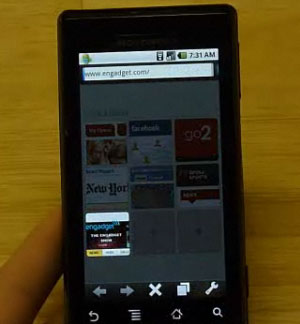 Earlier today Opera announced the launch of Mini 5 Beta for Android that brought new features and an improved experiece to your mobile browsing. What I felt and said was the best characteristic of Opera Mini 5 was the way it handles page rendering – it compresses them on their own servers and sends that optimized version to your phone, greatly reducing load times. Engadget did a quick test comparing the typical Android browser to Opera Mini 5 when loading Engadget on the Motorola Droid. Unfortunately they didn’t allow embedding so you’ll have to watch here if you’re so inclined.
Spoiler alert: Opera Mini 5 CRUSHED the native Android browser in load time.
- Android Browser: 42-seconds
- Opera Mini 5 Beta: 27-seconds
Not only that but Opera Mini 5 loads the full page of content immediately, then taking additional time to fill in the cached pictures. It isn’t ONLY about speed but speed is of huge importance and Opera does that very well in the latest version of their Mini browser for Android.
[Via Engadget]








The speed is definitely noticeable on my HTC Magic!
No question, Opera min is way faster than the stock browser. The tap to zoom feature seems to be pretty simple to use too, and seems to be way more responsive than “pinch to zoom”.
Question:
“Compresses the page on their own site” Doesn’t that mean that they are loading what could be private information on their servers? Doesn’t that worry anyone?
I just tested it out on my g1 (rooted running superd) and its MUCH MUCH faster than the stock browser. However, I don’t like the way it renders web pages compared to the stock browser. For example, log onto gmail through the stock browser and mini5 and notice the difference. I much prefer the way the stock browser handles it. (using browser for my second gmail account, seeing as the g1 gmail app only allows for one account. So now i’m torn between speed or viewing the page the way I like it. Decisions decisions….
For me it is 90% about loading speed, 10% about interface–by which I mean, how fast I can type in a new URL. With the native browser and Dolphin and Steel it’s slow to get to the latter, for various reasons. Mini 5 does very well on these points.
I have no option to zoom not even to tap. I have also noticed some images don’t load properly. But at least it loads faster.
you can’t compare a full browser with a server browser. For having used opera mini a lot on s60 platform, I can tell you that images look like shit on opera mini because they are recompress on the server. And if you go to a web page that opera’s servers have never went it actually takes as much time has going with the normal browser because of that recompression. From my point of view, client side web browsers are always gonna be better event if a little slower.
I was not refering to the quality of images, but instead images that don’t load all the way or not at all.
The only thing that bothers me is no multi touch support on my Nexus One
documented video test
http://www.youtube.com/watch?v=6I-ez5jlAkE
My all text browser crushes then both!
Mini works well for non-interactive pages, but you will probably find many sites that perform poorly. Opera’s docs state “The majority of JavaScript functions are available, except those that require asynchronous operations or user interaction once the page has been loaded” (think Google Maps, for example). Good for reading, bad for modern web apps.
this is NOTICEABLY faster on a rooted droids stock brower but lack of pinch to zoom odd page renderings does hurt the browser experience. I’m sure with some updates I will be using this as my primary browser and my stock browser will go back on the app drawer..
I used Opera Mini when I used to have a BlackBerry. It served its purpose. The stock browser on the G1 is not that great, but I haven’t liked anything else. Opera Mini is very speedy but it compresses pics and renders poorly in some situations. I plan on using Opera for quick searching, and using the stock browser for any google sites. I am hoping that the Android Firefox is as good as the desktop version.
Yes, it’s “fast”, but once you get over the speed, the browser is crap. It has more rendering errors than IE4, it can’t do any meaningful Javascript to save its life, and it butchers the layout. Plus the images look like crap.
Still waiting for Fennec
I think the browser is much faster than the stock browser but my issue is i have downloaded it twice but no application shortcut appears in my app drawer. the only way i can use the app is if i go back to the market and open it or do a quick search on my phone and the app appears. Mytouch 3g 1.0 with tmobile, not rooted.
I run this Opera and Xscope G on my HTC GSM Hero (w/chin). What a rockin’ combo! :)
I hope Google see this as an opportunity to improve its own browser on the phones.
Downloaded Opera today, I will be removing the other browser tomorrow… I love the homepage, alphabetical order of favorites, and the load time is incredible.
Awesome speed! I have D0lph1n 8rowser and its quite a bit faster than that… Loving the tap to zoom feature. awesome job guys!
Thanks for those who recommended xscope on Phandroid. I’d have never heard of it otherwise. And there’s just something about it that I like. I tried to like Dolphin, but I can’t. Opera Mini 5 beta, which I’d tried before previously on my Hero as a java version, has a great UI that I find unmatched by the other mobile browsers. It may not render certain pages that well, pics are not that high quality due to compression, but I find that it’s a pleasure to use and it’s FAST. Great for browsing purely text sites where you don’t care about pics. I’ll still use the stock browser for sites where I have to enter passwords in, like facebook. Not keen on letting 3rd party browsers know my passwords.
@Jeffrey
That’s why I won’t use it.
I found that Opera Mini 5 beta murdered my battery life, so I uninstalled it. People having issues with picture rendering, just go into settings and set the picture quality to high.
love it so far. it is fast… and I love the dailer homepage since I mainly hit the same few pages on a daily basis. can’t wait to be able to set it as default.
The main thig I DO NOT LIKE about it is that I am unable to download it at all into my Archos 5 IT. Whichever webside I use as a source for download, it leads me on link
market://search?q=pname:com.opera.mini.android
And this is always a blind path, same as for another apps links started with word “market”.
Hey @gwlaw99 – where can one find an Android text browser? I have been looking for one for my little Tattoo for ages now and have come up with squat so far.
Re: Opera 5 – its good – and quick for many things. And once I found Opera Bridge which allows you to go to Opera from a link, its been pretty perfect for most things.