
 By
By HTC has just put four free widgets on Market. These are for Hero and Eris only – naturally Sense UI equipped devices. I guess this answers our question from yesterday!
Dice: Tap the dice first, and then simply shake (do not throw!) your phone to “throw” the dice. This widget is only for HTC Hero & Droid Eris
Today in History: In this widget, learn about significant events and famous people who were born or who died on this day in history. Tap a link to view the corresponding article on Wikipedia.
Tip Calculator: You can adjust the tip percentage and the number of people in the group before calculating.
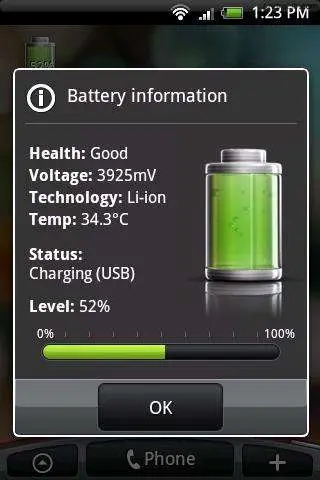
Battery: Tap the widget to see more battery information.
This leaves me wondering what more HTC put on the market in the future. If any of you Hero or Eris users download these be sure to let us know what you think!
[ AndroidCentral | AndroLib ]









“These are for Hero and Eris only” I’m missing something. Don’t the HTC devices already come with these widgets?
HELLS YEAH>>> FIRST>.. HTC IS VIRAL…
As long as they are Google/HTC Nexus/Passion compatiable..
HTC only, ouch.
Well the Nexus One = HTC… Kind off.. I just hope HTC widgets out the core Sense UI widgets for the non-HTC/HTC google phones…lol
Not only is it HTC only, it’s Verizon only. These will not run on the HTC Magic, at least not the T-Mobile version. Somebody needs to try these out on a Sprint Hero, or some other HTC Sense enabled phone.
Work well on my Eris, only kept the battery one
none of them would install on my magic running myhero v. 2.0.5
not impressed
though they don’t look all that great anyway..
None of them work on my Sprint HTC Hero. I just get launch errors.
I wonder if Sense is just being discarded, and their way of maintaining the Sense look after upgrades to the Android version is going to be via maintaining these apps for HTC branded phones. Add in a home screen replacement app by HTC for HTC phones, and they can maintain their 7 screens, and have “Sense” still in spirit, but still offer the most current Android.
Works on sprint hero… Awesome animation but nothing else. Font looks cruddy.
Gives me a Launch Error on Sprint Hero.
I like that idea.
They won’t load on a UK rooted MCR 3.0 Hero.
I did get all 4 apps to work on my Sprint Hero.
Nevermind, the apps work for me too. I was doing it wrong..
guys i have the sprint hero and i am pissed because none of these apps ran on my phone!!!!
Love the battery widget – can’t be arsed with the others!
Works just fine on my Sprint Hero. Dice widget sucks. Battery widget is pretty sweet.
Where are my props I said this Yesterday. Hero/Eris if you look at HTC widgets section have options to install more HTC Widgets, Thanks HTC!
Just downloaded the battery widget for my Eris. I like it, and it’s a pretty convenient tool.
These work on my HTC Hero. Just need to run them from the HTC Widget
It works perfectly on my orange hero with mcr 3.0.
Got an installer force close on my Sprint Hero running Unofficial Modaco 1.3, but after clearing the warning they all ran fine. None of them have the standard Sense “select which layout you want” screen that all the default widgets have, so there’s no customization, but still not bad. I’ll keep the battery widget and the This Day in History widget running, even though TDIH requires an entire screen and, as I mentioned before, theres no customization. I could see the dice being useful as a sort of heads-or-tails or pick-a-number argument settler. The tip calculator I have no use for because I’m capable of doing math in my head :).
battery widget works great on my cdma sprint hero.
best battery widget out, i think.
@matthews the article says the widgets are compatible with hero.
tried them all, nothing to scream about. today in history is neat but overall color me less than impressed
Install on a Telus HTC Hero with MCR 3.0 comes up with “incompatible update”.
downloaded all 4 widgets on my Srint HTC Hero & all ran fine. Only decided to keep the battery widget, this is the best battery widget I’ve used on my phone and hands down blows all other battery widgets out the water that are on the Android Market.
Thanks HTC!
dice on a phone…. well i guess i would always have dice on me if i decided to play 3 man
Droid does! Apparently not……
Doesn’t even show up on DROID
Downloaded the battery widget and added it to my second home screen on my Sprint Hero. Works very well and gives a nice amount of information.
For those that stated “Droid does! Apparently not…..” and “Doesn’t even show up on DROID”…did you even read the article? These are widgets made by HTC for two specific HTC devices. The last time I checked the MOTOROLA Droid wasn’t an HTC device.
I downloaded Battery and Today in History for my Sprint Hero. Worked perfectly. Don’t try to launch them as apps, just use the + button on bottom right-hand corner and launch it from the HTC Widgets screen.
None of these work on my Droid Eris, tried several times then gave up.
Had no problems with them. Really enjoy the “Today in History.” I don’t think a widget constitutes “sucking” if you don’t use/need them. They are well built widgets and do exactly what they say. Good job HTC.
Works on my imported HTC Hero (white one, with chin). They all work (except the Today in History is always trying to update). I like the battery one best. Dice is ok if you are just goofing off. Tip calculator is pretty sweet too, but it takes up a lot of screen real estate. Definitely keeping the battery one though…
Well, well, well… they send a cease and desist letter to LevelUp Studio (creator of Beautiful Widgets, Beautiful Silence Widgets, and Beautiful Widgets: Pack 2). Then release free widgets only to Hero and Eris.
What about the G1 (no love for the early adopters), or any other HTC model? HTC, you are slowly losing my loyalty. Piss on you!
battery widget is A+
Works great on my eris….I. love the battery widget its very convenient
Today in History does not work on the Eris. I just downloaded it and tried to run it. I received an error message.
actually, HTC created Beautiful Widgets. LevelUp just copied it to the pixel.
@TM….you tellem TM…some foos just don’t read things through…ha..sad but oh so true
Even though Droid can’t use HTC widgits….Droid still is one of the most badest ass phones out there if not the badest…..DROIDDDDD!
only got the battery widget. i think it’s pretty dang sweet. other ones (and info under settings) generally show the percentage only in multiples of ten. but this one is accurate to the ones. i like that.
Dice works on my behold 2 so it should work for all other 1.5 and higher android phones
@Pavi (post 43): don’t run it from the App tray. Access HTC widgets from your home screen and choose the appropriate widget.
I have a European Hero running on 1.5 – the battery meter and Today In History widgets work. I didn’t bother to try the other 2.
I have to say that aesthetically, I prefer the look of the vizBattery battery widget, but the HTC widget actually bubbles and fizzes on your homescreen as you charge your phone, and that visual effect looks REALLY nice. If you press on the widget while it’s charging, the pop-up info window also shows the green liquid in the battery bubbling away.
I’ll try the HTC one for the moment, see how it compares with vizBattery with regard to battery drain. The latter seemed pretty energy efficient to me.
Magic users are screwed again… thanks a bunch HTC!
I think those widgets are fake, not from HTC. Look at the contact email address… it’s [email protected] not [email protected]. This is probably some joker who thinks its a good idea to spoof HTC, give them a bad name ( cause his ratings are low ) and then get kicked from the market.
Battery widget is good. I’m not seeing the usefulness of the rest, personally.
I really dont like it that I can’t get this on my Tattoo!!!
downloaded all kept battery very handy – tip calc kept maybe for future use. dice bit pointless.
today in history takes up to much room – great apps
works on my t-mobile HTC Hero in the UK
@ari-free
LevelUp wrote his own code and licensed his images from another developer. What HTC did is scummy and typical of big-business. What LevelUp did was perfectly legally. There are no laws preventing you or anyone else from writing your own program that looks like another program as long as it is all original. I can go build a word processor that looks just like MS Word as long as I write my own code and create my own images…and don’t use any of their trademarks like their name. I couldn’t call it Macrosoft Word Processor.
I am sure HTC didn’t (nor should they be able to) patent the display of a clock and the weather! They just know that they can afford to send a C&D and 99% of small time developers will have to shut down rather than fight a bogus claim because they can’t afford it.
Battery widget looks great, but I noticed it is a DRAIN on the resource it monitors, so I un-installed it and no more excessive drain. I guess I COULD kill it with ATK, but then I would have to wait for it to load every time I load my home. I can get all the battery info I need in the settings. Now the dice roll? THAT’S nice!
Turns out they don’t work on a Hero with modded 2.0 Rom on it, Oh well
These widgets work very nicely on the unlocked version of the HTC Hero!
I personally think HTC should leave the customer the chance of having a phone without the sense UI for various reasons:
– any update on the OS i have it right away
– If I go 4 android, why having a UI that ruins android looks? It looks pretty much the same as the sense 4 WM devices!. Is like having an Iphone UI on top of the Android.
– I personally do not want anything that could barely interfere between my phone and Android, in that case people like me are being left only to the Nexus choice.