
 By
By  If you’re a twittering Android user, you probably already have your preference of Twitter applications on Android Market. But if you’re still looking for something better, you might want to check out Seesmic which recently landed on Android Market (and BlackBerry devices).
The application features 4 tabs: Timeline, @Replies, Direct Messages, and Profile:
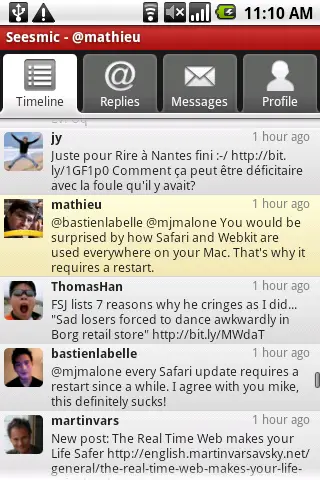
If you press “Menu” you can also refresh, compose or mess around with the applications settings. Check out a few official videos of the app in action:
The folks at CNET tested the application and seemed to like it for the most part, but they pointed out a few quirks. First of all, it only provides support for one user which SHOULD bode fine for the vast majority of users, but for folks who have a personal account and a blog or company account, it presents a problem. The keyboard not automatically popping up when you compose a message is also listed as an irritation – things I’m sure they’ll fix sooner rather than later.
Give Seesmic a Twhirl and lets us know what you think. ( <— See what I has did ova thurr?)











Is it free ?
For now Twitterride is the one for me .
It’s free.
I’m trying this so far i like some parts of it. But my main Droid app for Twitter is Twidroid. It has lists even in the free version.
For now I will run both.
@choperdan666
That’s why I love my Cliq!
tried and its pretty good to bad i do not use twitter much
Still like TWitdroid Pro. Share refreash is great and the new widget on this weeks new release is great. It’s just more polished than Seesmic..but to be fair, Seesmic is 1.0. Competition is GOOD!
I like Twidroid too. But have been a long-time fan of Seesmic on the desktop.
My top 3 picks for Android Twitter apps are: Twidroid, Seesmic, TwitterRide.
BTW – from what I can tell Seesmic is the only one that has video uploads integrated into Android app.
I’m not big on twitter myself. I use twidgit lite. It’s got a nice widget that just lets me use twitter like an rss feed from some of the publications I follow in twitter.
It’s nice, but I still like twidroid. It has a nice ui and it seems to be pretty functional. The only thing I don’t like is that there is no dedicated compose button. Other than that you should try it out for yourself and see what you think.
I’ll stay with HTC Peep i have on my Hero…
My favorite by far is Swift. Light, fast, functional — exactly what twitter is supposed to be! Found it in ADC2, but it’s on the market too.
I still use twidroid as it is faster atm. But Seesmic is very promising !
The killer-feature of Seesmic for me is that it can shortens URL “on the go” : you type your text + your 200-characters URL, and click on the shorten button and it replaces your URL by the short one.
Very convenient, and I was looking for this feature as it keeps me from having to copy-paste multiple parts of text :)
u guys are a daily read via my hero, but being about android shouldn’t u support a mobile version of ur site?
i like that you click on the tweet to see the tweet and long press for options.. i think twidroid is sort of weird with it’s button to the far right.. just make the whole tweet clickable. Seesmic crashes a lot of the droid, though.
look & feel, usability: Seesmic
speed, stability, features: Twitdroid
I’m currently using Swift, and for me its the best… it’s faster than Seesmic and it never crashes in my Galaxy (I7500).